







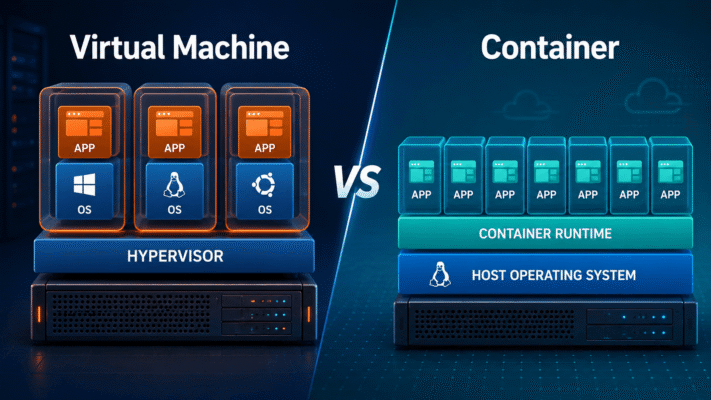
Virtual Machine vs Container: What Is the Difference?
Imagine you need to run three applications.
One is a web server.
One is a database.
One is a background worker.
You could buy three physical servers.
Or you could run three virtual machines.
Or you could run three containers.
At first, virtual machines and containers can look like they solve the same problem:
Run multiple isolated workloads on one physical machine.
But they do it in very different ways.
The easiest way to understand the difference is this:
Virtual Machine
=
Virtualizes a whole computer
while:
Container
=
Isolates an application environment
That single distinction explains almost everything else.
Start With a Physical Server
Suppose you have one physical machine:
CPU
RAM
SSD
Network
Without virtualization or containers, it might run:
Linux
  ↓
Application
Simple.
But what happens when you want several independent workloads?
This is where VMs and containers enter the story.
What a Virtual Machine Does
A virtual machine pretends to be a complete computer.
It gets virtual versions of:
- CPU
- RAM
- Disk
- Network interface
- Firmware
- Hardware devices
Then you install an operating system inside it.
Conceptually:
Physical Hardware
       ↓
Hypervisor
       ↓
Virtual Machine
       ↓
Guest Operating System
       ↓
Application
The guest operating system believes it owns a computer.
It does not need to know that the computer is virtual.
A VM Is Like Building Another House
Imagine your physical server is a piece of land.
A virtual machine is like building a complete house on that land.
Each house has its own:
- Kitchen
- Bathroom
- Electricity
- Plumbing
- Doors
- Walls
One house does not need to share its internal structure with another.
That independence is powerful.
But it also means each house is relatively heavy.
A VM brings a whole operating system with it.
What a Container Does
A container is lighter.
Instead of creating a complete virtual computer, it creates an isolated environment for an application.
The structure looks more like:
Physical Hardware
       ↓
Host Operating System
       ↓
Container Runtime
       ↓
Container
       ↓
Application
The important difference is that containers generally share the host operating-system kernel.
They do not each boot a separate kernel.
A Container Is More Like an Apartment
Using the same analogy:
A virtual machine is a separate house.
A container is an apartment inside one building.
Each apartment has its own:
- Rooms
- Furniture
- Doors
- Private space
But they share the building's:
- Foundation
- Main structure
- Plumbing infrastructure
- Electrical infrastructure
That shared foundation is similar to the host kernel.
This is why containers are much lighter.
The Architecture Side by Side
A VM host might look like this:
Physical Server
      ↓
Hypervisor
  ┌────┼────┐
  ↓    ↓    ↓
 VM1  VM2  VM3
  ↓    ↓    ↓
 OS   OS   OS
  ↓    ↓    ↓
 App  App  App
A container host looks more like:
Physical Server
      ↓
Linux Kernel
      ↓
Container Runtime
  ┌────┼────┐
  ↓    ↓    ↓
 C1   C2   C3
  ↓    ↓    ↓
 App  App  App
The VM version has multiple operating-system kernels.
The container version shares one.
That Is Why Containers Are Smaller
Suppose you want to run a simple web API.
Inside a VM, you might need:
Ubuntu
systemd
kernel
system libraries
runtime
application
The VM disk image may be several gigabytes.
Inside a container, you might need only:
runtime
libraries
application
The host already provides the kernel.
So the image may be much smaller.
Boot Time Is Very Different
Starting a VM means booting an operating system.
The sequence is roughly:
Start VM
   ↓
Virtual firmware
   ↓
Kernel starts
   ↓
Init system starts
   ↓
Services start
   ↓
Application starts
That can take seconds or longer.
Starting a container is usually closer to:
Create isolated process
       ↓
Start application
That can happen almost immediately.
This difference becomes important when you want to scale quickly.
Suppose Traffic Suddenly Spikes
Your application normally needs:
3 instancesThen traffic increases.
You suddenly need:
20 instancesWith VMs, you may need to boot many complete operating systems.
With containers, the platform can often start many lightweight application instances much faster.
That is one reason containers became popular in cloud environments.
Isolation Is Different Too
A VM has its own kernel.
So the isolation boundary looks like:
Application
    ↓
Guest Kernel
    ↓
Hypervisor
    ↓
Host
A container looks more like:
Application
    ↓
Shared Host Kernel
    ↓
Host
This means VM isolation is usually stronger.
If something compromises the guest OS inside one VM, there is still a hypervisor boundary between that VM and other VMs.
Containers share more underlying infrastructure.
That does not mean containers are insecure.
It means the isolation model is different.
VMs Can Run Different Operating Systems
This is one of the biggest advantages of virtual machines.
One physical server could run:
VM 1 → Windows Server
VM 2 → Debian
VM 3 → Ubuntu
VM 4 → FreeBSD
at the same time.
Each VM has its own operating system.
Containers normally cannot do that in the same way.
A Linux container relies on a Linux kernel.
A Windows container relies on a Windows kernel.
You cannot simply run a normal Linux container directly on a Windows kernel without some virtualization layer underneath.
Containers Are More Tied to the Host Kernel
This often confuses beginners.
You may see a container image labeled:
Ubuntuand assume:
This container is running a complete Ubuntu operating system.
Not exactly.
It contains Ubuntu userspace files and libraries.
But it still uses the host's Linux kernel.
Conceptually:
Ubuntu container userspace
          ↓
Host Linux kernel
That is different from an Ubuntu VM, which boots its own kernel.
A VM Is a Machine Boundary
A container is more of an application/process boundary.
This is a useful way to think about it:
VM:
"Give me another computer."
Container:
"Give me an isolated place to run this application."That is why VMs are commonly used for infrastructure.
Containers are commonly used for applications.
Let's Build the Same Application Both Ways
Suppose you have an ASP.NET Core web application.
VM approach
You create:
Ubuntu VMThen install:
.NET runtime
Nginx
Application
Configuration
The result:
VM
├── Ubuntu
├── .NET
├── Nginx
└── Web App
Container Approach
You build an image containing:
.NET Runtime
Application
and perhaps use another container for Nginx.
The result could be:
Container 1 → Web App
Container 2 → Nginx
Both run on the same host kernel.
The container model separates the application into smaller deployable units.
VMs Usually Feel Like Servers
When you create a VM, you often manage it like a traditional machine.
You might:
SSH into it
Install packages
Edit files
Restart services
Upgrade the OS
You might give it a hostname:
erp-server-01and keep it running for years.
Containers Usually Feel Like Processes
Containers are normally treated very differently.
Instead of:
SSH into container and fix it.the preferred model is:
Build new image
      ↓
Replace old container
A container might live for:
5 minutesand that can be perfectly normal.
The individual container is often disposable.
This Leads to Two Different Cultures
VM administration often follows:
Create machine
Maintain machine
Patch machine
Repair machine
Container operations often follow:
Build image
Deploy image
Replace container
Repeat
That is a major philosophical difference.
What Happens When an Application Crashes?
In a VM environment:
Application crashes
      ↓
Restart service
The VM itself remains.
In a container environment:
Container fails
      ↓
Delete container
      ↓
Start replacement
Or an orchestrator such as Kubernetes does it automatically.
This is why containerized applications are often designed around replaceable instances.
Persistent Data Needs Different Thinking
Suppose your database runs in a VM.
The database files may simply live on the VM's virtual disk.
Database VM
     ↓
Virtual Disk
That feels very natural.
With containers, the container itself is usually considered disposable.
So important data should live outside it:
Database Container
        ↓
Persistent Volume
        ↓
Database Files
Destroy the container:
Container gonebut:
Data remainsThis is a critical container concept.
Containers Encourage Stateless Applications
A web application is easier to scale when the container does not keep important state locally.
Instead:
Web Container
     ↓
Database
Redis
Object Storage
If the container dies, another one can take its place.
This is often called a stateless application design.
VMs Can Be Stateful More Naturally
A VM behaves like a long-lived server.
So it is common to put:
Database
Files
Configuration
Application state
inside the VM.
That can be simpler for traditional systems.
Neither model is automatically better.
They encourage different architecture.
Resource Overhead
Suppose you run ten workloads.
With ten VMs, you may have:
10 guest kernels
10 init systems
10 sets of system services
10 OS installations
All of that consumes:
- RAM
- CPU
- Disk space
With ten containers:
1 host kernel
10 isolated applications
The overhead can be much lower.
This means you can often fit more containers than VMs onto the same machine.
Imagine a 64 GB Server
With VMs, perhaps you allocate:
VM 1 → 8 GB
VM 2 → 8 GB
VM 3 → 8 GB
VM 4 → 8 GB
VM 5 → 8 GB
A significant amount of memory is used by each guest OS.
With containers, the same applications may use less overhead because the host kernel is shared.
This does not mean containers use no memory.
It simply means there is less duplicated operating-system infrastructure.
Portability
Containers are excellent deployment packages.
You can build:
myapp:1.4.2then run the same image on:
Developer laptop
Test server
CI runner
Production server
Kubernetes cluster
Cloud platform
provided the underlying platform supports the required container environment.
This portability is one of the biggest advantages of containers.
VMs Are Portable Too, But Heavier
You can also move a VM.
For example:
VM disk image
+
VM configuration
can be migrated to another compatible hypervisor.
But a VM image might be:
40 GBwhile an application container might be:
300 MBMoving and starting containers is generally much lighter.
Snapshots
VMs have extremely useful snapshot capabilities.
Before upgrading:
Create snapshot
      ↓
Upgrade
      ↓
Problem?
      ↓
Rollback
This can be extremely convenient.
Containers tend to handle version rollback differently.
Instead of restoring the old container state:
Deploy previous image versionFor example:
myapp:2.0fails, so redeploy:
myapp:1.9Different tools.
Same goal.
Networking
A VM normally receives a virtual network card.
Conceptually:
VM
 ↓
Virtual NIC
 ↓
Virtual Switch
 ↓
Physical NIC
It behaves almost like another machine on the network.
A container usually receives an isolated network namespace.
Conceptually:
Container
 ↓
Virtual Interface
 ↓
Container Network
 ↓
Host
 ↓
Physical NIC
Containers often rely heavily on port mappings, service discovery, and overlay networks.
Where Docker Fits
Docker is primarily associated with containers.
It provides tools to:
Build images
Run containers
Manage networks
Manage volumes
Push images
Pull images
Docker does not behave like a classic VM hypervisor.
It relies on operating-system container features.
So:
Docker
≠
Virtual Machine
even though Docker Desktop may internally use a VM on some platforms to provide the Linux environment required by Linux containers.
Where Proxmox Fits
Proxmox can manage both:
Virtual Machinesand:
LXC ContainersSo one Proxmox host may look like:
Physical Server
      ↓
Proxmox
  ┌──────┼──────┐
  ↓      ↓      ↓
 VM    LXC     VM
This is useful because some workloads make more sense as full VMs while others can use lightweight containers.
Where Kubernetes Fits
Kubernetes manages containers.
It does not normally replace the hypervisor.
A common production stack is:
Physical Server
      ↓
Hypervisor
      ↓
Linux VMs
      ↓
Kubernetes
      ↓
Containers
People sometimes ask:
If we have containers, why do we still need VMs?
Because the two layers solve different problems.
The hypervisor isolates machines.
Kubernetes manages applications.
Why Cloud Providers Often Use Both
Imagine a cloud provider hosting many customers.
They may use VMs to provide strong customer isolation:
Customer A VM
Customer B VM
Customer C VM
Then Customer A runs Kubernetes inside their VM:
Customer A VM
     ↓
Kubernetes
     ↓
50 containers
So:
Hardware isolation
+
Application isolation
work together.
Security
Virtual machines generally provide a strong boundary because each VM has its own kernel.
A vulnerability inside:
VM Adoes not automatically provide access to:
VM BThe attacker would need to cross the hypervisor boundary.
Containers share the host kernel, so host-kernel security becomes especially important.
That is why container environments often add:
- namespaces
- cgroups
- seccomp
- capabilities
- SELinux
- AppArmor
- rootless containers
to strengthen isolation.
Does This Mean VMs Are Always More Secure?
Not necessarily.
Security depends on:
- Configuration
- Software versions
- Permissions
- Network design
- Images
- Host hardening
- Hypervisor security
- Operational practices
But in terms of isolation architecture, a separate guest kernel generally creates a stronger boundary.
Performance
Both technologies can perform extremely well.
VMs have some virtualization overhead because the guest OS interacts with virtual hardware.
Modern CPU virtualization features reduce much of this overhead.
Containers are closer to normal host processes, so overhead is generally lower.
This often makes containers especially efficient for high-density application hosting.
But "Containers Are Always Faster" Is Too Simple
Suppose your application is waiting on:
Database
Network
Storage
The difference between container and VM CPU overhead might barely matter.
For many applications, architecture and storage performance matter far more.
The choice should not be based only on benchmark numbers.
Use a VM When You Need a Whole Operating System
A VM is a good fit when you need:
- Windows Server
- Different kernel
- Legacy software
- Strong isolation
- Complete OS environment
- Traditional server administration
Example:
Windows Active Directory ServerA VM is a natural choice.
Use a Container When You Need to Package an Application
Containers are a good fit for:
- Web APIs
- Web applications
- Workers
- Microservices
- CI jobs
- Development environments
- Scalable services
Example:
ASP.NET APIis an excellent container workload.
Databases Can Run in Either
You may hear:
Never run databases in containers.
That is too absolute.
Databases can run very well in containers when storage, backups, resources, and orchestration are designed correctly.
But for smaller teams, a database VM can sometimes be simpler to understand and operate.
For example:
Database VMwith predictable storage and backup procedures may be easier than building a complex stateful Kubernetes deployment.
The right answer depends on the environment.
A Small Company's Infrastructure
Imagine a company with one powerful server.
It needs:
ERP
Database
Website
Redis
VPN
Monitoring
One approach is all VMs:
Proxmox
├── ERP VM
├── Database VM
├── Website VM
├── Redis VM
├── VPN VM
└── Monitoring VM
This works.
But it may use more resources than necessary.
A Mixed Approach
A more flexible design might be:
Proxmox
│
├── Database VM
├── VPN VM
└── Application VM
      │
      └── Docker
          ├── ERP
          ├── Website
          ├── Redis
          └── Monitoring
Now the infrastructure-heavy components have VM isolation.
The application workloads use containers.
This is extremely common in real environments.
And at Larger Scale
Eventually:
Physical Servers
      ↓
Hypervisor Cluster
      ↓
Linux VMs
      ↓
Kubernetes
      ↓
Containers
This may seem like many layers.
But each layer solves a separate problem.
Physical hardware
→ compute resources

Hypervisor
→ machine isolation

VM
→ operating-system environment

Kubernetes
→ workload orchestration

Container
→ application package
Once you see the responsibilities separately, the architecture makes more sense.
VM vs Container Comparison
| Area | Virtual Machine | Container |
|---|---|---|
| Virtualizes | Complete machine | Application environment |
| Kernel | Own guest kernel | Usually shares host kernel |
| Size | Usually larger | Usually smaller |
| Startup | Slower | Faster |
| Isolation | Stronger machine boundary | Lighter process boundary |
| OS flexibility | Can run different OSes | Tied to compatible host kernel |
| Resource overhead | Higher | Lower |
| Typical lifetime | Long-lived | Often disposable |
| Management style | Server administration | Image-based deployment |
| Scaling | Heavier | Very fast |
| Portability | Good | Excellent |
| Common tools | Proxmox, ESXi, Hyper-V | Docker, Podman, containerd |
| Orchestration | Hypervisor cluster | Kubernetes |
| Best for | Complete servers | Applications and services |
The Wrong Question
People sometimes ask:
Are containers replacing virtual machines?
Not really.
That is similar to asking:
Are applications replacing operating systems?
They exist at different levels.
Containers often run inside virtual machines.
And those VMs run on physical servers.
The complete stack might be:
Application
    ↓
Container
    ↓
Linux VM
    ↓
Hypervisor
    ↓
Physical Server
Each layer has a job.
Another Wrong Question
Which is better, VM or container?
There is no universal answer.
Ask instead:
Do I need another computer?If yes:
VMAsk:
Do I need another isolated application environment?If yes:
ContainerThat mental model gets you surprisingly far.
A Simple Story to Remember
Imagine a large office building.
A VM is like building several completely independent houses inside a huge property.
Each house has its own:
Kitchen
Bathroom
Electricity
Heating
Security
Very independent.
Very safe.
But expensive.
A container is like creating many offices inside the same building.
Each company gets its own:
Room
Door
Furniture
Work area
but everyone shares:
Building
Elevators
Foundation
Main utilities
Much more efficient.
But they share more infrastructure.
Why VMs Changed the Data Center
Before VMs:
10 applications
=
10 servers
After VMs:
10 applications
=
maybe 2 physical servers
+
10 VMs
This dramatically improved hardware utilization.
Why Containers Changed Application Deployment
Before containers:
Application
+
Installation instructions
+
Hope
After containers:
Application
+
Runtime
+
Dependencies
=
Image
That dramatically improved deployment consistency.
So the Evolution Looks Like This
Physical Server Era
       ↓
Virtual Machine Era
       ↓
Container Era
       ↓
Container Orchestration Era
But newer layers did not completely replace the old ones.
Instead, they stacked together.
Final Thoughts
Virtual machines and containers are both forms of isolation.
But they isolate at different levels.
A VM says:
Give me my own computer.
A container says:
Give my application its own isolated environment.
That leads to two very different architectures.
VM:

Hardware
   ↓
Hypervisor
   ↓
Guest OS
   ↓
Application
and:
Container:

Hardware
   ↓
Host OS
   ↓
Container Runtime
   ↓
Application
VMs provide stronger isolation and full operating-system flexibility.
Containers provide lighter weight, faster startup, easier scaling, and excellent application portability.
In many modern environments, the answer is not:
VM or Containerbut:
VM + ContainerVirtual machines organize the infrastructure.
Containers organize the applications.
And together they form much of the foundation of modern cloud computing.