







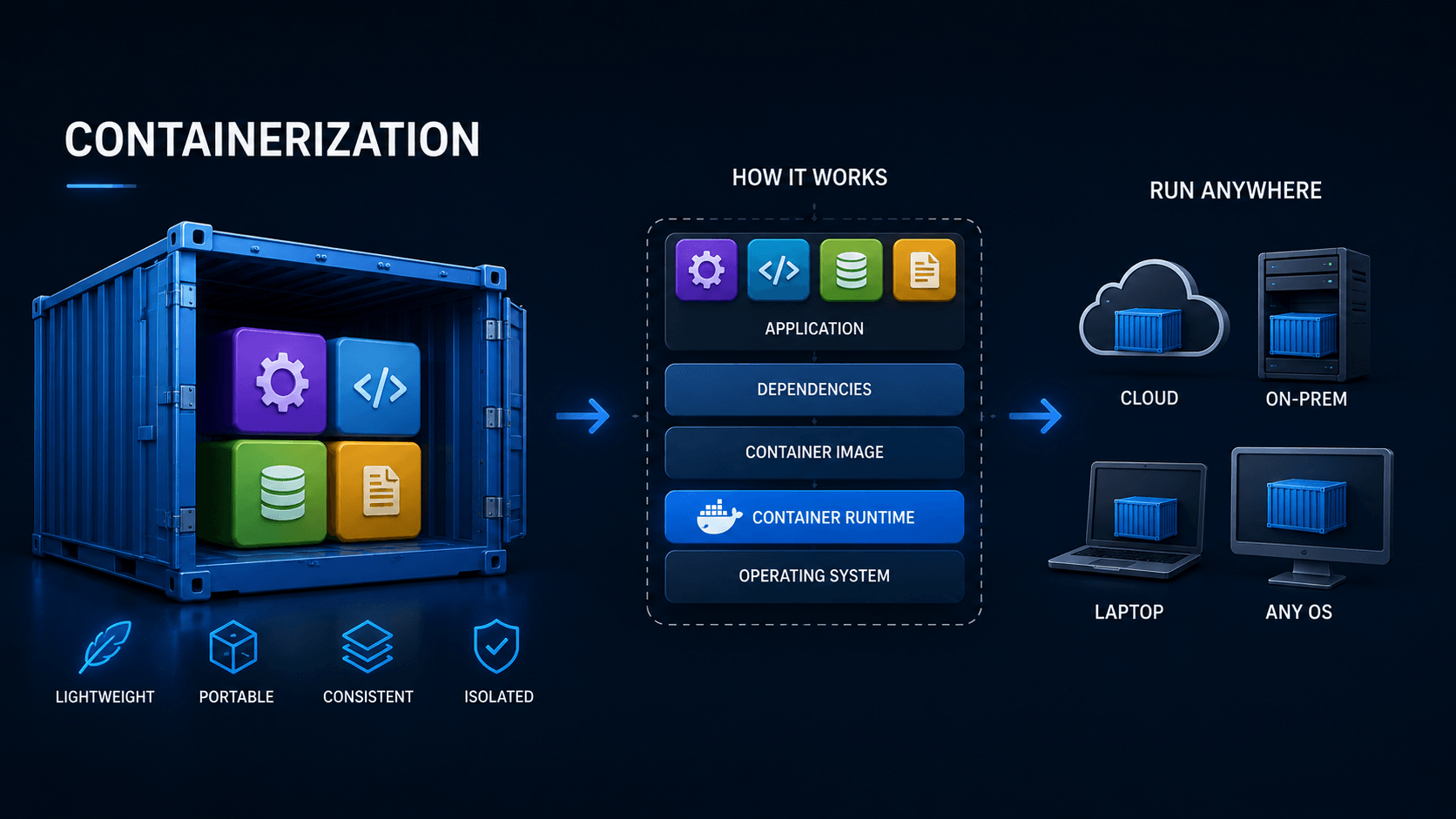
What Is Containerization?
Imagine you built an application on your laptop.
It works perfectly.
You test it again.
Still perfect.
Then you deploy it to a server.
And suddenly:
It does not work.The server has a different library version.
The operating system is slightly different.
A package is missing.
A configuration file is in another place.
Your application expects one version of Python, Node.js, Java, or .NET, but the server has another.
This eventually leads to one of the oldest jokes in software development:
"But it works on my machine."
Containerization was created largely to make that sentence less common.
The basic idea is simple:
Package the application together with everything it needs to run.
Then move that package from one machine to another.
That package is called a:
ContainerBefore Containers
Suppose you have a web application.
It needs:
Your application
Node.js 24
Some system libraries
Configuration
Dependencies
On your laptop, everything is already installed.
So the application works.
Now you move the application to another server.
That server might have:
Node.js 22
Different OpenSSL version
Missing libraries
Different timezone
Different package versions
Now your deployment becomes:
Application
    ↓
Server differences
    ↓
Unexpected problems
Developers spent enormous amounts of time fixing environment differences like these.
The Old Deployment Story
A traditional deployment often looked like this:
New server
   ↓
Install Linux
   ↓
Install runtime
   ↓
Install libraries
   ↓
Configure packages
   ↓
Copy application
   ↓
Configure environment
   ↓
Start application
Then another server needed the same application.
So the entire process happened again.
And again.
And again.
It worked.
But keeping every server identical was difficult.
What If We Could Package the Environment Too?
Instead of copying only:
application.exeor:
app.jswhat if we packaged:
Application
+
Runtime
+
Libraries
+
Dependencies
+
Configuration defaults
into one standardized unit?
Then deployment could become:
Build once
   ↓
Create container image
   ↓
Run same image everywhere
That is containerization.
A Container Is Like a Shipping Container
The name is surprisingly appropriate.
Before standardized shipping containers, cargo could arrive in many forms:
Boxes
Barrels
Sacks
Crates
Machinery
Every port needed different ways to handle everything.
Then standardized shipping containers changed global transportation.
Suddenly:
Ship
Train
Truck
Crane
only needed to understand the container.
They did not need to care much about what was inside.
Software containers work similarly.
The infrastructure sees:
ContainerInside might be:
ASP.NET Core
Node.js
Python
Java
Nginx
PostgreSQL
Redis
The host mostly cares about how to run the standardized container.
A Simple Example
Suppose you build an ASP.NET Core application.
Without containers:
Server
├── Linux
├── .NET runtime
├── system libraries
├── application files
└── configuration
You must make sure all of those pieces match what your application expects.
With containerization:
Server
   ↓
Container Runtime
   ↓
┌────────────────────┐
│ Application        │
│ .NET Runtime       │
│ Required Libraries │
│ Dependencies       │
└────────────────────┘
The application environment travels with the application.
Docker Made Containers Popular
Containers existed before Docker.
Linux had technologies such as:
chroot
namespaces
cgroups
LXC
that provided pieces of container isolation.
But Docker made the idea much easier to use.
Instead of manually configuring Linux isolation features, developers could describe an application using a simple file:
DockerfileBuild it:
docker build -t myapp .and run it:
docker run myappThat simplicity helped containers become mainstream.
What Is Inside a Container?
A container usually includes:
- The application
- Required libraries
- Runtime dependencies
- Filesystem contents
- Environment defaults
But there is something important it usually does not include:
A complete operating-system kernelThat is one of the biggest differences between containers and virtual machines.
Virtual Machine vs Container
A virtual machine looks roughly like this:
Physical Server
      ↓
Hypervisor
      ↓
Virtual Machine
      ↓
Guest Operating System
      ↓
Application
Each VM has its own operating-system kernel.
A container looks more like:
Physical Server
      ↓
Host Operating System
      ↓
Container Runtime
      ↓
Container
      ↓
Application
Containers share the host kernel.
That makes them much lighter.
Imagine Moving Houses
A virtual machine is like moving an entire house.
You bring:
Walls
Kitchen
Bathroom
Furniture
Electrical system
Everything
A container is more like moving a furnished apartment unit inside an existing building.
You bring what the application needs, but the building infrastructure is shared.
That shared infrastructure is the host operating system.
Why Containers Are Smaller Than VMs
A VM might contain:
Ubuntu kernel
systemd
drivers
system libraries
applications
A container often contains only:
Application
Runtime
Libraries
Minimal userspace
This can make container images much smaller than full VM images.
For example, conceptually:
Virtual Machine:
Several GB
while a simple container image might be:
Hundreds of MBor sometimes much less.
The exact size depends entirely on the application and base image.
Containers Start Much Faster
Starting a VM means booting an entire operating system.
Conceptually:
Start VM
   ↓
Virtual BIOS/UEFI
   ↓
Kernel boots
   ↓
Init system starts
   ↓
Services start
   ↓
Application starts
A container usually starts more like:
Create isolated process
   ↓
Start application
That can happen very quickly.
This is one reason containers are excellent for applications that need to scale dynamically.
The Kernel Is Shared
This is one of the most important things to understand.
Suppose the host runs Linux.
You start five Linux containers:
Container A
Container B
Container C
Container D
Container E
They all ultimately use:
Host Linux KernelConceptually:
          Containers
     ┌────┼────┼────┐
     │    │    │    │
    A    B    C    D
     └────┼────┼────┘
          │
     Linux Kernel
          │
       Hardware
Each container feels isolated.
But they are not running five independent Linux kernels.
Then How Does Isolation Work?
Linux provides several technologies that make containers appear independent.
Two of the most important are:
Namespacesand:
cgroupsYou do not need to understand their internals to understand containers.
The general idea is simple.
Namespaces: "You Only See Your World"
Namespaces control what a process can see.
For example, a container can have its own view of:
- Processes
- Network interfaces
- Hostname
- Mount points
- Users
Container A might see:
PID 1
PID 10
PID 15
Container B might also see:
PID 1
PID 8
PID 12
Both believe they have their own process environment.
The host sees the actual underlying processes.
cgroups: "You Can Only Use This Much"
Control groups, or cgroups, manage resource usage.
For example:
Container A
CPU limit: 2 cores
Memory limit: 1 GB
Container B
CPU limit: 4 cores
Memory limit: 8 GBWithout limits, one container could potentially consume excessive resources.
cgroups help prevent that.
So a Container Is Really an Isolated Process
This surprises many people.
A container is not necessarily a tiny virtual machine.
At a lower level, it is much closer to:
Normal Linux process
+
isolated filesystem
+
isolated network
+
isolated process view
+
resource limits
That is why containers are so lightweight.
What Is a Container Image?
Before you run a container, you usually create an:
ImageAn image is a packaged template.
Think of it like:
BlueprintThe container is a running instance of that blueprint.
So:
Image
   ↓
docker run
   ↓
Container
You can create many containers from the same image.
Image vs Container
A useful analogy is:
Class
   ↓
Object
for programmers.
Or, for everyone else:
Cookie cutter
   ↓
Cookies
The image is the reusable definition.
The containers are the running copies.
One Image, Many Containers
Suppose you create:
my-web-app:v1You might run:
Container 1
Container 2
Container 3
Container 4
all from the same image.
They have the same application version.
That makes scaling much easier.
This Solves "Works on My Machine"
Imagine development:
Developer Laptop
      ↓
myapp:1.0
Testing:
Test Server
      ↓
myapp:1.0
Production:
Production Server
      ↓
myapp:1.0
The operating environment inside the container is much more consistent.
So instead of:
Works on my machine.the idea becomes:
It is the same container image.That does not eliminate every deployment problem.
But it removes a large class of environment-related problems.
The Dockerfile
A Dockerfile tells Docker how to build an image.
For example:
FROM nginx:alpine

COPY ./website /usr/share/nginx/html
Then:
docker build -t mywebsite .Docker creates an image.
Run it:
docker run -p 8080:80 mywebsiteNow the website is available through port 8080 on the host.
The details vary by application, but the basic workflow remains:
Write Dockerfile
      ↓
Build image
      ↓
Run container
Images Have Layers
Container images are normally built in layers.
Suppose an image looks like:
Ubuntu base
    ↓
Install runtime
    ↓
Install dependencies
    ↓
Copy application
Each step can become a reusable layer.
This allows container systems to avoid repeatedly copying identical data.
If ten applications use the same base image, much of that data can be shared locally.
Container Registries
Once you build an image, you need somewhere to store it.
That is where registries come in.
Examples include:
Docker Hub
GitHub Container Registry
Azure Container Registry
Amazon ECR
Google Artifact Registry
Private registries
The workflow becomes:
Developer
   ↓
Build image
   ↓
Push to registry
   ↓
Server pulls image
   ↓
Run container
This is a major part of modern CI/CD.
A Modern Deployment Story
Suppose a developer pushes code to GitHub.
Then:
Git Push
   ↓
CI Pipeline
   ↓
Build Application
   ↓
Build Container Image
   ↓
Run Tests
   ↓
Push Image to Registry
   ↓
Production pulls image
   ↓
Start new containers
The deployment artifact is no longer:
A folder full of filesIt is:
A versioned container imageThat makes deployments much more predictable.
Versioning Becomes Easier
You might have:
myapp:1.0
myapp:1.1
myapp:2.0
Production currently runs:
myapp:1.1You deploy:
myapp:2.0Something goes wrong.
Instead of trying to reverse every changed file, you can often redeploy:
myapp:1.1The old application environment already exists as an image.
Containers Are Usually Disposable
Traditional administrators often treat servers like pets.
They have names.
They are carefully maintained.
Someone remembers:
Do not restart server-03 because something strange happens.Containers encourage a different mindset.
If a container breaks:
Delete it.Then start a new one from the image.
Conceptually:
Container failed
      ↓
Remove container
      ↓
Start replacement
      ↓
Continue
The important state should usually live outside the container.
"Cattle, Not Pets"
This philosophy is sometimes described as:
Pets vs CattleA pet server:
server01is carefully repaired.
A containerized workload is more like:
web-1
web-2
web-3
web-4
If web-2 dies:
Start another one.The individual instance is less important than the service as a whole.
But What About Data?
Suppose you run PostgreSQL in a container.
If containers are disposable, does deleting the container delete your database?
It could, if you design it badly.
Persistent data should normally live separately.
For example:
PostgreSQL Container
       ↓
Persistent Volume
       ↓
Database Files
The container can be destroyed and recreated.
The volume remains.
Volumes
A volume provides persistent storage outside the container's temporary writable layer.
Conceptually:
Container
   │
   ├── Application files
   │
   └── /data
         │
         ▼
      Volume
Delete the container:
Container gonebut:
Volume remainsThen a replacement container can attach to the same data.
Networking Between Containers
Suppose your application has:
Frontend
Backend
Database
Redis
Instead of installing everything into one environment, you can run four containers.
Frontend Container
       ↓
Backend Container
       ↓
Database Container
       ↓
Redis Container
They communicate over a container network.
This allows each component to have its own environment.
This Encouraged Microservices
Containers did not invent microservices.
But they made microservices much easier to operate.
Instead of one giant application:
ERP Applicationyou might have:
Authentication Service
Sales Service
Inventory Service
Billing Service
Notification Service
Reporting Service
Each can have its own container image.
That allows teams to deploy and scale services independently.
But You Do Not Need Microservices to Use Containers
This is important.
Containers are useful even for a normal monolithic application.
For example:
ASP.NET Core ERPcan simply become:
ERP ContainerYou still gain:
- Predictable deployments
- Easy versioning
- Isolation
- Portable environments
- Easier CI/CD
You do not need to split everything into 50 services.
Docker Compose
Now imagine your application needs:
Web App
MySQL
Redis
Starting them manually gets annoying.
Docker Compose lets you describe the group.
Conceptually:
services:
  app:
    ...

  mysql:
    ...

  redis:
    ...
Then:
docker compose upand the entire application stack starts.
For development and small deployments, this is extremely convenient.
Then the Problem Became: Too Many Containers
Docker made running one container easy.
Then companies started running:
10 containers
100 containers
1,000 containers
10,000 containers
Now new questions appeared:
Which server should run each container?

What if a server fails?

How do we scale?

How do we update containers?

How do we load balance them?

How do we manage networking?

How do we restart failed containers?
This created the need for container orchestration.
Enter Kubernetes
Kubernetes does not primarily create containers.
It manages them at scale.
Imagine you tell Kubernetes:
I want 5 copies of my web application.Kubernetes attempts to maintain:
5 running copiesIf one crashes:
4 runningKubernetes notices and starts another.
Back to:
5 runningThis is called maintaining the desired state.
Kubernetes Thinks in Desired State
Traditional administration:
Start server.
Restart service.
Move application.
Kubernetes-style administration:
I want 5 replicas.The platform decides how to achieve that.
Conceptually:
Desired:
5 containers

Actual:
4 containers

Kubernetes:
Start 1
That idea is extremely powerful.
Containers Changed Scaling
Imagine a website suddenly gets much more traffic.
With traditional servers:
Buy another server
Install OS
Install dependencies
Deploy application
Configure load balancer
With containers:
Increase replicas:
3 → 10
The infrastructure can create more copies quickly.
When traffic falls:
10 → 3This elasticity is one of the reasons containers work so well with cloud infrastructure.
Containers and the Cloud Fit Naturally Together
The cloud provides:
Compute
Storage
Networking
Load balancers
Containers provide:
Portable application unitsOrchestration provides:
Automated placement and scalingCombine them:
Cloud
+
Containers
+
Kubernetes
=
Modern cloud-native infrastructure
Containerization Is Not Magic
Containers solve many problems.
They also create new ones.
You still need to think about:
- Security
- Networking
- Logging
- Storage
- Backups
- Secrets
- Monitoring
- Resource limits
- Updates
If anything, large container platforms can become extremely complex.
Containers Are Not Automatically Secure
A container is isolated from the host and from other containers.
But that isolation is not identical to having a completely separate machine.
Remember:
Containers share the host kernel.If there is a serious vulnerability in the host kernel or container runtime, isolation can potentially be broken.
This is one reason virtual machines are still important.
VM Isolation vs Container Isolation
A VM has:
Guest kernelseparate from the host.
A container shares:
Host kernelSo conceptually:
VM

App
 ↓
Guest Kernel
 ↓
Hypervisor
 ↓
Host Hardware
versus:
Container

App
 ↓
Shared Host Kernel
 ↓
Hardware
VMs generally provide a stronger isolation boundary.
Containers provide greater efficiency.
So Should We Use VMs or Containers?
Often the answer is:
Both.A very common architecture looks like:
Physical Server
      ↓
Hypervisor
      ↓
Linux Virtual Machines
      ↓
Kubernetes
      ↓
Containers
The VM provides infrastructure isolation.
Containers provide application packaging and orchestration.
They solve different problems.
A Real-World Example
Imagine a company has three physical servers.
Without virtualization or containers:
Server 1 → ERP
Server 2 → Website
Server 3 → Database
Later they add virtualization:
Physical Servers
       ↓
Hypervisor Cluster
       ↓
VMs
Then containers:
VM 1
 ├── Web Container
 ├── API Container
 └── Redis Container
Then Kubernetes:
Kubernetes Cluster
 ├── Web × 5
 ├── API × 8
 ├── Worker × 3
 └── Background Jobs
Each technology adds another level of flexibility.
Why Developers Love Containers
From a developer's perspective, containers solve an annoying problem:
"I need PostgreSQL."Instead of installing PostgreSQL manually:
docker run postgresNeed Redis?
docker run redisNeed an Nginx test server?
docker run nginxYou can create temporary environments quickly and delete them afterward.
Development Environments Become Reproducible
Imagine five developers join a project.
Without containers:
Developer A:
PostgreSQL 16

Developer B:
PostgreSQL 15

Developer C:
Wrong Redis version

Developer D:
Missing library

Developer E:
Everything somehow works
With containers:
docker compose upEveryone starts roughly the same services.
That saves enormous amounts of setup time.
Why Operations Teams Love Containers
Operations teams gain:
- Standardized deployment artifacts
- Easier rollbacks
- Easier scaling
- Better automation
- Cleaner CI/CD
- More consistent environments
Instead of deployment instructions like:
SSH to server.

Copy these files.

Install package X.

Edit configuration Y.

Restart service Z.
you can have:
Deploy image:
myapp:2.4.1
That is much easier to automate reliably.
Why Businesses Like Containers
Businesses usually do not care whether something uses Docker or containers.
They care about outcomes.
Containers can help provide:
Faster deployments
More reliable releases
Better infrastructure usage
Simpler scaling
Easier disaster recovery
Consistent environments
Those are business advantages.
The Famous "Works on My Machine" Problem Revisited
Without containerization:
Developer Machine
    ↓
Different Test Server
    ↓
Different Production Server
Each environment has unique details.
With containerization:
         Same Image
      ┌─────┼─────┐
      ↓     ↓     ↓
    Dev   Test   Prod
The host infrastructure can still differ.
But the application environment is much more consistent.
That is the real benefit.
Containers Encourage Immutability
Traditional servers often change over time.
Today:
Install package A.Tomorrow:
Change configuration B.Next month:
Upgrade library C.Eventually nobody remembers exactly how the server reached its current state.
This is sometimes called:
Configuration driftContainers encourage a different model.
Instead of modifying the running container:
Build a new image.So:
v1 image
   ↓
change code/config
   ↓
v2 image
   ↓
replace v1 containers
The deployment becomes reproducible.
Do Not SSH Into Containers and "Fix" Them
You technically can enter a container:
docker exec -it container bashBut changing production containers manually is usually a bad habit.
Why?
Because the next time the container is recreated:
Your manual changes disappear.The better approach is:
Change Dockerfile/configuration
       ↓
Build new image
       ↓
Deploy new container
That keeps the environment reproducible.
Containers Have Short Lives
A traditional server might live for:
5 yearsA container might live for:
5 minutesor:
5 hoursand that is completely normal.
Applications must therefore be designed differently.
Important state should not depend on one container continuing to exist forever.
Logs Should Leave the Container
If a container disappears and all its logs disappear with it, debugging becomes difficult.
So production environments typically send logs to external systems.
For example:
Container
   ↓
stdout/stderr
   ↓
Logging system
   ↓
Elasticsearch / Loki / Cloud Logging / etc.
Again, the container itself is disposable.
The important operational data is stored elsewhere.
Configuration Should Also Be External
You normally do not want different container images for:
Development
Testing
Production
just because the database URL changes.
Instead:
Same image
+
Different configuration
For example:
DATABASE_URL
REDIS_URL
ENVIRONMENT
API_KEY
can be provided when the container starts.
This keeps the image portable.
Secrets Need Special Treatment
Passwords and API keys should not simply be baked into container images.
Why?
Because anyone who can access the image might retrieve them.
Instead, production systems normally inject secrets separately.
The general principle is:
Image:
Application

Runtime:
Configuration + Secrets
Keep those responsibilities separate.
The Container Runtime
Docker is not the only technology capable of running containers.
Modern systems commonly use runtimes such as:
containerd
CRI-O
Docker itself uses container-related components underneath its higher-level developer experience.
The important concept is not the specific product.
The important concept is:
OCI-style container images
+
Container runtime
The industry has become increasingly standardized around common image and runtime formats.
Containers Are Not Just Docker
People often say:
Dockerwhen they really mean:
ContainersDocker made containers popular and remains widely used.
But containerization is broader than Docker.
For example:
Docker
Podman
containerd
CRI-O
Kubernetes
all participate in the modern container ecosystem in different ways.
Podman
Podman provides a Docker-like container experience and is popular in some Linux environments.
Many commands look familiar:
podman run nginxinstead of:
docker run nginxThe architecture and operational philosophy can differ, but both work with container concepts.
What About LXC?
LXC containers are somewhat different from the application-container style commonly associated with Docker.
Docker-style containers often run:
One main application or serviceLXC can feel more like:
Lightweight Linux systemFor example, Proxmox supports LXC containers that can behave much more like small Linux servers.
So the word "container" covers several related approaches.
Container vs VM vs Physical Server
A simple comparison:
| Area | Physical Server | Virtual Machine | Container |
|---|---|---|---|
| Hardware | Dedicated | Virtualized | Shared |
| Kernel | Own | Own | Usually shared |
| Startup | Slow | Moderate | Fast |
| Resource overhead | Highest | Medium | Low |
| Isolation | Strong | Strong | Lighter |
| Portability | Low | Good | Excellent |
| Typical size | Whole machine | GBs | MBs–GBs |
| Typical use | Base infrastructure | OS isolation | Application packaging |
Think of Them as Layers
A useful mental model is:
Physical machine
       ↓
Virtualization
       ↓
Operating systems
       ↓
Containers
       ↓
Applications
Each layer solves a different problem.
A Small Story
Imagine two developers.
Alice writes a web application.
Bob manages production.
Alice says:
It needs:

Ubuntu 24.04
Node.js version X
library Y
package Z
these five environment variables
and this configuration.
Bob manually installs everything.
A month later Alice updates the application.
Now it requires:
Different runtime
New library
Different package
Bob changes the server again.
After two years, nobody fully understands the server.
Then the company adopts containers.
Alice gives Bob:
myapp:3.2.0Bob runs that image.
Next release:
myapp:3.3.0The deployment changes from:
"Here are 14 steps to upgrade the server."to:
"Run this version of the image."That is why containerization became so popular.
Then Imagine 100 Servers
Now scale the same idea.
Suppose the company has:
100 serversWithout standardized application packaging, every server slowly becomes slightly different.
With container images:
Application version 2.4
=
Image sha256:...
The exact same artifact can be deployed across the fleet.
This is a huge operational advantage.
Why Containerization Became So Important
Containerization appeared at exactly the right time.
Software was moving toward:
Cloud
Microservices
DevOps
CI/CD
Distributed systems
All of those needed a reliable way to package and move applications.
Containers became that unit.
The Container Became the Deployment Unit
Earlier:
Deployment unit:
ZIP file
or:
Executableor:
Server installation procedureToday, increasingly:
Deployment unit:
Container Image
That is a major architectural shift.
Does Every Application Need Containers?
No.
A simple application running on one server may work perfectly with:
systemd
+
binary
Containers add another layer.
That layer is worthwhile when you need benefits such as:
- Reproducibility
- Isolation
- Portability
- Frequent deployments
- Scaling
- CI/CD automation
But containers should solve a real problem, not simply be used because they are fashionable.
When Containers Make Sense
Containers are particularly useful for:
- Web applications
- APIs
- Background workers
- Microservices
- CI/CD jobs
- Development environments
- Kubernetes workloads
- Temporary test environments
For example:
Web API
Worker
Redis
Nginx
are natural container workloads.
When a VM Might Be Easier
A VM may be easier when you need:
- A complete operating system
- Strong OS-level isolation
- Different kernels
- Traditional server software
- Complex legacy applications
- Desktop environments
For example:
Windows Serveras a complete environment is naturally represented as a VM.
Containers Changed How We Think About Servers
Before containers, administrators often asked:
What applications are installed on this server?
After containers, the question increasingly becomes:
What workloads are scheduled on this host?
The host becomes infrastructure.
The individual application environment moves into the container.
The Host Becomes Less Important
In a mature container environment, you ideally do not care very much whether a specific application runs on:
node-01or:
node-07The platform decides.
If node-01 fails:
Move/restart workloads elsewhere.This is very different from traditional server administration.
The Bigger Idea
Containerization is not really about Docker commands.
It represents a larger change:
Treat infrastructure as replaceable.
Treat applications as packages.
Treat deployments as repeatable.
That philosophy is one of the foundations of modern DevOps.
Final Thoughts
At first, containerization seems like just another way to run an application.
But its real value is consistency.
Without containers:
Application
+
Whatever happens to be installed on the server
With containers:
Application
+
Known runtime environment
=
Container Image
That image can travel through:
Developer laptop
      ↓
CI pipeline
      ↓
Test environment
      ↓
Production
with far fewer environmental differences.
Virtual machines made it possible to turn:
One physical computerinto:
Many virtual computers.Containers took the next step.
They made it possible to package:
An applicationas a standardized, portable, isolated unit.
And Kubernetes took that idea even further by asking:
What if we automatically manage thousands of those units?So the evolution looks roughly like this:
Physical Servers
      ↓
Virtual Machines
      ↓
Containers
      ↓
Container Orchestration
      ↓
Cloud-Native Infrastructure
The technology underneath can become complicated.
But the original idea is beautifully simple:
Package the application with what it needs, and make it run the same way wherever you send it.
That idea helped turn "works on my machine" from an excuse into an engineering problem we can actually solve.