







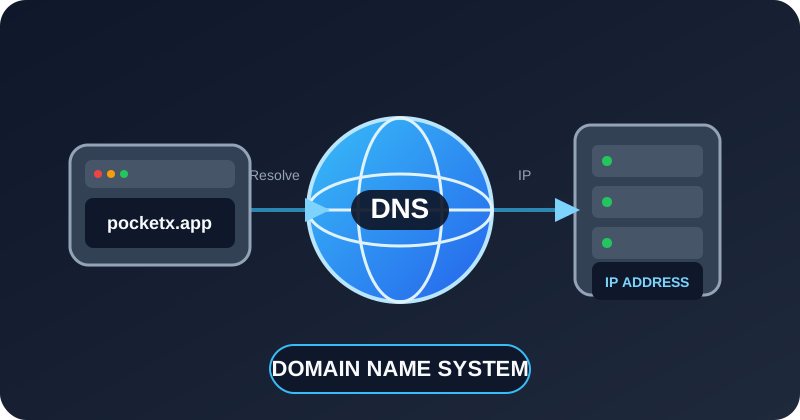
What is DNS?
DNS — Domain Name System is the system that translates human-readable domain names into IP addresses that computers can use to communicate.
For example, people prefer to use:
pocketx.appinstead of remembering an IP address such as:
203.0.113.25DNS performs the translation between the two.
DNS is often described as the phonebook of the Internet.
Why Do We Need DNS?
Computers communicate over IP networks using IP addresses.
Humans, however, find names much easier to remember.
Without DNS, users would have to remember the IP address of every website or service they wanted to access.
Instead of:
https://203.0.113.25we can use:
<blockquote class="wp-embedded-content" data-secret="GS5YukvxIp"><a href="https://pocketx.app/">Home 20</a></blockquote><iframe class="wp-embedded-content" sandbox="allow-scripts" security="restricted" style="position: absolute; visibility: hidden;" title="“Home 20” — PocketX" src="https://pocketx.app/embed/#?secret=0fxYrEENy6#?secret=GS5YukvxIp" data-secret="GS5YukvxIp" width="500" height="282" frameborder="0" marginwidth="0" marginheight="0" scrolling="no"></iframe>DNS determines which IP address belongs to the requested domain.
Simple DNS Example
Suppose you enter:
pocketx.appinto a browser.
The browser needs to know where the server is located.
A simplified DNS lookup looks like this:
User
 │
 │ pocketx.app
 ▼
Browser
 │
 ▼
DNS Resolver
 │
 │ "What is the IP for pocketx.app?"
 ▼
DNS System
 │
 │ IP Address
 ▼
Browser
 │
 ▼
PocketX Web Server
After DNS returns the address, the browser can connect to the server.
DNS Resolution Process
A DNS lookup may involve several different DNS servers.
A typical lookup looks like:
Browser
   │
   ▼
Recursive DNS Resolver
   │
   ▼
Root DNS Server
   │
   ▼
.app TLD DNS Server
   │
   ▼
Authoritative DNS Server
   │
   ▼
IP Address Returned
The major components are:
- DNS client
- Recursive resolver
- Root name server
- Top-Level Domain server
- Authoritative name server
Step-by-Step DNS Lookup
Suppose the user wants to open:
app.pocketx.appThe process can be simplified as follows.
Step 1 — Browser Checks Cache
The browser may already know the address from a previous lookup.
Browser DNS CacheIf the record exists and has not expired, the browser can use it immediately.
Step 2 — Operating System Checks Cache
If the browser does not know the answer, the operating system may check its local DNS cache.
Browser
   │
   ▼
Operating System DNS Cache
Step 3 — Recursive DNS Resolver
If the result is not available locally, the request is sent to a recursive DNS resolver.
The resolver may be provided by:
- Your ISP
- Your organization
- A public DNS provider
- Your router
- A private DNS server
Examples of public DNS resolvers include:
Cloudflare DNS
1.1.1.1

Google Public DNS
8.8.8.8

Quad9
9.9.9.9
Recursive DNS Resolver
A recursive resolver performs DNS lookups on behalf of clients.
Example:
Computer
   │
   │ pocketx.app?
   ▼
Recursive Resolver
If the resolver already has the answer in its cache, it returns it immediately.
Otherwise, it begins querying other DNS servers.
Root DNS Server
The Root DNS Server is at the top of the DNS hierarchy.
It does not normally provide the final IP address for:
pocketx.appInstead, it tells the resolver which DNS servers are responsible for the:
.appTop-Level Domain.
Conceptually:
Resolver
   │
   │ Where is pocketx.app?
   ▼
Root DNS Server
   │
   │ Ask the .app TLD servers
   ▼
Resolver
Root DNS Server Hostnames
The DNS root is served by 13 logical root server identities, named from A through M.
Examples include:
a.root-servers.net
b.root-servers.net
c.root-servers.net
d.root-servers.net
e.root-servers.net
f.root-servers.net
Additional root server identities include:
g.root-servers.net
h.root-servers.net
i.root-servers.net
j.root-servers.net
k.root-servers.net
l.root-servers.net
m.root-servers.net
So a resolver trying to locate the .app TLD may conceptually perform a query such as:
Resolver
   │
   │ Query: .app NS
   ▼
a.root-servers.net
   │
   │ Referral to .app TLD servers
   ▼
Resolver
The resolver does not always contact a.root-servers.net specifically. It can use any reachable root server.
Are There Only 13 Root Servers?
There are 13 logical root server names:
A
B
C
D
E
F
G
H
I
J
K
L
M
But this does not mean there are only 13 physical servers worldwide.
Each logical root server can operate many server instances around the world using technologies such as Anycast.
Conceptually:
                a.root-servers.net
                       │
            ┌──────────┼──────────┐
            │          │          │
            ▼          ▼          ▼
         Asia       Europe    North America
        Instance    Instance      Instance
To DNS clients, these distributed instances behave as part of the same logical root service.
Root DNS Hierarchy Example
For:
pocketx.appthe hierarchy is:
.
└── app
    └── pocketx
The lookup begins from the root:
.The root tells the resolver where to find:
.appThe .app TLD servers then tell the resolver which authoritative DNS servers manage:
pocketx.appTop-Level Domain Server
A Top-Level Domain — TLD server manages information about domains under a particular domain extension.
Examples of TLDs include:
.com
.net
.org
.app
.dev
.io
.bd
.uk
For:
pocketx.appthe relevant TLD is:
.appThe .app TLD server helps locate the authoritative DNS server responsible for pocketx.app.
Root
 │
 ▼
.app TLD
 │
 ▼
Authoritative DNS Server
Authoritative DNS Server
The authoritative DNS server contains the official DNS records for a domain.
For example, the authoritative DNS server for:
pocketx.appmay contain a record such as:
pocketx.app → 203.0.113.25The resolver asks:
What is the IP address of pocketx.app?The authoritative server returns the appropriate DNS record.
Complete DNS Resolution Flow
User enters:

pocketx.app

        │
        ▼

Browser Cache

        │
        ▼

Operating System Cache

        │
        ▼

Recursive Resolver

        │
        ▼

Root DNS Server
a.root-servers.net
or another root server

        │
        ▼

.app TLD Server

        │
        ▼

Authoritative DNS Server
for pocketx.app

        │
        ▼

203.0.113.25

        │
        ▼

Recursive Resolver caches result

        │
        ▼

Browser receives IP

        │
        ▼

Browser connects to PocketX server
More Detailed Lookup Example
A DNS lookup for:
api.pocketx.appcan conceptually look like this:
Client
  │
  │ api.pocketx.app?
  ▼
Recursive Resolver
  │
  │
  │ Ask root
  ▼
a.root-servers.net
  │
  │ "I don't know api.pocketx.app,
  │  but here are the .app DNS servers."
  ▼
Recursive Resolver
  │
  │ Ask .app TLD
  ▼
.app TLD DNS Server
  │
  │ "pocketx.app is handled by
  │  these authoritative nameservers."
  ▼
Recursive Resolver
  │
  │ Ask authoritative server
  ▼
Authoritative DNS
for pocketx.app
  │
  │ api.pocketx.app = 203.0.113.40
  ▼
Recursive Resolver
  │
  ▼
Client
DNS Hierarchy
DNS uses a hierarchical structure.
Consider:
api.erp.pocketx.appThe hierarchy can be represented as:
.
└── app
    └── pocketx
        └── erp
            └── api
At the highest level is the DNS root:
.Below it is the TLD:
.appBelow that is the registered domain:
pocketx.appAnd below that can be subdomains:
www.pocketx.app
api.pocketx.app
erp.pocketx.app
mail.pocketx.app
Domain Name Structure
Consider:
api.pocketx.appIt can be broken down as:
api.pocketx.app
│      │      │
│      │      └── Top-Level Domain
│      └───────── Second-Level Domain
└──────────────── Subdomain
So:
api      → Subdomain
pocketx  → Domain name
.app     → Top-Level Domain
Fully Qualified Domain Name
A Fully Qualified Domain Name — FQDN identifies the complete location of a host in DNS.
Example:
api.pocketx.appTechnically, the absolute DNS name can be represented with a trailing dot:
api.pocketx.app.The final dot represents the DNS root.
The complete hierarchy is therefore:
api.pocketx.app.
            │
            └── DNS Root
The trailing dot is normally omitted in everyday use.
DNS Records
DNS stores information in different types of records.
Some of the most common DNS record types are:
| Record | Purpose |
|---|---|
| A | Maps a name to an IPv4 address |
| AAAA | Maps a name to an IPv6 address |
| CNAME | Creates an alias to another hostname |
| MX | Specifies mail servers |
| TXT | Stores text information |
| NS | Specifies authoritative DNS servers |
| SOA | Contains DNS zone authority information |
| PTR | Reverse DNS lookup |
| SRV | Specifies service location |
| CAA | Controls which CAs may issue certificates |
A Record
An A record maps a domain name to an IPv4 address.
Example:
pocketx.app
    ↓
203.0.113.25
DNS record:
pocketx.app. A 203.0.113.25Another example:
api.pocketx.app. A 203.0.113.40AAAA Record
An AAAA record maps a domain name to an IPv6 address.
Example:
pocketx.app. AAAA 2001:db8::25The name AAAA is used because an IPv6 address is four times the size of an IPv4 address.
CNAME Record
A CNAME — Canonical Name record creates an alias pointing to another hostname.
Example:
www.pocketx.app
        │
        ▼
pocketx.app
Record:
www.pocketx.app. CNAME pocketx.app.The resolver then resolves the target hostname.
MX Record
An MX — Mail Exchange record specifies which mail server receives email for a domain.
Example:
pocketx.app
     │
     ▼
mail.pocketx.app
Possible record:
pocketx.app. MX 10 mail.pocketx.app.The number represents the preference or priority.
Lower values normally have higher priority.
TXT Record
A TXT record stores text-based information in DNS.
It is commonly used for:
- Domain verification
- SPF
- DKIM
- DMARC
- Security policies
- Application verification
Example:
pocketx.app. TXT "v=spf1 include:mail.pocketx.app -all"NS Record
An NS — Name Server record indicates which DNS servers are authoritative for a domain.
For example:
pocketx.app. NS ns1.pocketx.app.
pocketx.app. NS ns2.pocketx.app.
Conceptually:
pocketx.app
     │
     ├── ns1.pocketx.app
     └── ns2.pocketx.app
These servers are responsible for answering authoritative DNS queries for the zone.
SOA Record
The SOA — Start of Authority record contains important administrative information about a DNS zone.
It typically includes:
- Primary DNS server
- Administrator contact
- Zone serial number
- Refresh interval
- Retry interval
- Expiration time
- Negative caching information
Example:
pocketx.app. SOA ns1.pocketx.app. admin.pocketx.app. (
    2026081701
    3600
    900
    1209600
    300
)
PTR Record
A PTR record is used for reverse DNS lookups.
Normal DNS lookup:
api.pocketx.app
       ↓
203.0.113.40
Reverse DNS lookup:
203.0.113.40
       ↓
api.pocketx.app
PTR records are particularly important for mail servers and network diagnostics.
SRV Record
An SRV record identifies the hostname and port for a particular service.
It is commonly used by:
- SIP
- LDAP
- XMPP
- Microsoft services
- VoIP systems
Example:
_sip._tcp.pocketx.appAn SRV record can specify:
Priority
Weight
Port
Hostname
For example:
_sip._tcp.pocketx.app. SRV 10 10 5060 sip.pocketx.app.CAA Record
A CAA — Certification Authority Authorization record specifies which certificate authorities may issue TLS certificates for a domain.
Example:
pocketx.app. CAA 0 issue "letsencrypt.org"This provides additional control over certificate issuance.
DNS Zone
A DNS zone is an administrative portion of the DNS namespace managed by a particular authoritative DNS service.
For example:
pocketx.appmight have a zone containing:
pocketx.app
www.pocketx.app
api.pocketx.app
erp.pocketx.app
mail.pocketx.app
vpn.pocketx.app
Conceptually:
pocketx.app
│
├── www
├── api
├── erp
├── mail
└── vpn
DNS Zone File
A traditional DNS zone file might look like:
$TTL 3600

@   IN SOA ns1.pocketx.app. admin.pocketx.app. (
        2026081701
        3600
        900
        1209600
        300
)

@       IN NS      ns1.pocketx.app.
@       IN NS      ns2.pocketx.app.

@       IN A       203.0.113.25
www     IN CNAME   pocketx.app.
api     IN A       203.0.113.40
erp     IN A       203.0.113.50
mail    IN A       203.0.113.60

@       IN MX 10   mail.pocketx.app.
DNS TTL
TTL — Time To Live defines how long a DNS record can be cached.
For example:
TTL = 3600means:
3600 seconds = 1 hourDuring this period, recursive resolvers may continue using the cached result.
Why DNS Caching Is Important
Without caching:
Client
  ↓
Resolver
  ↓
Root
  ↓
.app TLD
  ↓
Authoritative DNS
With caching:
Client
  ↓
Recursive Resolver Cache
  ↓
pocketx.app → 203.0.113.25
DNS caching improves:
- Performance
- Response time
- Reliability
- DNS server load
- Internet efficiency
DNS Propagation
Suppose the server for:
pocketx.appchanges from:
Old IP
203.0.113.25
to:
New IP
203.0.113.100
Some DNS resolvers may temporarily continue returning the old record because it is cached.
Resolver A → 203.0.113.25
Resolver B → 203.0.113.100
Resolver C → 203.0.113.25
Once the old cached records expire according to their TTL, the new record is retrieved.
This behavior is commonly called DNS propagation.
Recursive vs Authoritative DNS
| Recursive DNS | Authoritative DNS |
|---|---|
| Performs lookups for clients | Stores official DNS records |
| Caches results | Answers for zones it manages |
| Queries root/TLD/authoritative servers | Provides final authoritative answers |
| Used by end users | Used by DNS infrastructure |
Simplified:
Client
   │
   ▼
Recursive Resolver
   │
   ▼
Root
   │
   ▼
.app TLD
   │
   ▼
Authoritative DNS
for pocketx.app
Public DNS Resolver
Common public DNS resolvers include:
| Provider | IPv4 Address |
|---|---|
| Cloudflare | 1.1.1.1 |
| Google Public DNS | 8.8.8.8 |
| Quad9 | 9.9.9.9 |
For example:
Your PC
  │
  │ pocketx.app?
  ▼
1.1.1.1
  │
  ▼
DNS Infrastructure
  │
  ▼
IP Address
DNS Ports
Traditional DNS primarily uses:
UDP 53
TCP 53
UDP is commonly used for ordinary DNS queries.
TCP may be used for:
- Larger responses
- Zone transfers
- Some DNS operations
- Cases where a UDP response is truncated
DNS over HTTPS
DNS over HTTPS — DoH transports DNS queries using HTTPS.
It generally operates over:
TCP 443Conceptually:
Browser
   │
   │ HTTPS
   ▼
DoH Resolver
DNS over TLS
DNS over TLS — DoT transports DNS queries through TLS.
It commonly uses:
TCP 853Example:
Client
  │
  │ TLS
  ▼
DNS Resolver
DNSSEC
DNSSEC — Domain Name System Security Extensions provides cryptographic validation of DNS data.
DNSSEC helps verify that the DNS response is authentic and has not been modified.
It provides:
- Data origin authentication
- Data integrity
- Cryptographic verification
DNSSEC does not encrypt DNS queries.
DNS and Email
Suppose someone sends email to:
[email protected]The sending mail server performs an MX lookup:
pocketx.app MX?DNS might return:
10 mail1.pocketx.app
20 mail2.pocketx.app
Then the sending server connects to one of those mail servers.
Sender
   │
   ▼
DNS MX Lookup
   │
   ▼
mail1.pocketx.app
   │
   ▼
PocketX Mail Server
DNS is also used by:
SPF
DKIM
DMARC
DNS and Web Hosting
A typical configuration might use:
pocketx.appwith:
A
203.0.113.25
and:
www.pocketx.appwith:
CNAME
pocketx.app
Architecture:
pocketx.app
     │
     ▼
DNS
     │
     ▼
203.0.113.25
     │
     ▼
Web Server
DNS and API Servers
DNS can separate different services using subdomains.
For example:
pocketx.app
     │
     ├── www.pocketx.app
     ├── api.pocketx.app
     ├── erp.pocketx.app
     ├── auth.pocketx.app
     ├── mail.pocketx.app
     └── files.pocketx.app
These might point to different systems:
www.pocketx.app
      ↓
Web Server

api.pocketx.app
      ↓
API Server

erp.pocketx.app
      ↓
ERP Server

auth.pocketx.app
      ↓
Authentication Server
DNS and Load Balancing
DNS can return multiple addresses for the same hostname.
For example:
api.pocketx.app
      │
      ▼
DNS
      │
      ├── 203.0.113.40
      ├── 203.0.113.41
      └── 203.0.113.42
This can help distribute traffic among multiple servers.
Advanced DNS services can also provide:
- Geographic routing
- Weighted routing
- Latency-based routing
- Health-based failover
DNS and CDN
A Content Delivery Network can use DNS to direct users toward nearby infrastructure.
pocketx.app
     │
     ▼
DNS / CDN
     │
     ├───────────────┐
     │               │
     ▼               ▼
Asia User         Europe User
     │               │
     ▼               ▼
Asia Edge         Europe Edge
This can improve performance and reduce latency.
Internal DNS
Organizations may also maintain private DNS.
For example:
erp.pocketx.internal
db.pocketx.internal
git.pocketx.internal
redis.pocketx.internal
These hostnames might only be available inside the private company network.
Employees
    │
    ▼
Internal DNS
    │
    ├── ERP
    ├── Database
    ├── Git
    └── Redis
Split DNS
Split DNS allows the same hostname to resolve differently depending on where the query originates.
For example:
erp.pocketx.appInside the company network:
erp.pocketx.app
       ↓
10.10.10.20
From the public Internet:
erp.pocketx.app
       ↓
203.0.113.50
This is also called split-horizon DNS.
Useful DNS Commands
Windows
nslookup pocketx.appUsing PowerShell:
Resolve-DnsName pocketx.appLinux
Using dig:
dig pocketx.appUsing host:
host pocketx.appUsing nslookup:
nslookup pocketx.appQuery a Specific DNS Server
Cloudflare:
dig @1.1.1.1 pocketx.appGoogle:
dig @8.8.8.8 pocketx.appUsing nslookup:
nslookup pocketx.app 1.1.1.1Query Specific DNS Records
A record:
dig pocketx.app AAAAA record:
dig pocketx.app AAAAMX record:
dig pocketx.app MXNS record:
dig pocketx.app NSTXT record:
dig pocketx.app TXTQuery a Root DNS Server Directly
For learning or troubleshooting, you can query one of the root server identities directly.
For example:
dig @a.root-servers.net app NSAnother example:
dig @b.root-servers.net app NSThis asks a root server for information about the .app TLD.
The root server will normally return a referral to the DNS servers responsible for .app.
Conceptually:
dig @a.root-servers.net app NS
             │
             ▼
     Root DNS Server
             │
             ▼
      .app TLD Servers
Trace the DNS Resolution
A very useful command is:
dig +trace pocketx.appThis follows the DNS hierarchy.
Conceptually:
.
│
│ Root DNS
▼
.app
│
│ TLD DNS
▼
pocketx.app
│
│ Authoritative DNS
▼
Final DNS Record
This is useful for understanding DNS and troubleshooting delegation problems.
DNS Failure Example
Suppose this works:
ping 1.1.1.1but this fails:
ping pocketx.appThis can indicate that basic IP connectivity works but DNS resolution is failing.
Internet Connection
       │
       ├── IP communication ✓
       │
       └── DNS resolution ✗
Simple DNS Architecture
User
 │
 │ pocketx.app
 ▼
Browser
 │
 ▼
Recursive DNS Resolver
 │
 │
 ▼
Root DNS
a.root-servers.net
b.root-servers.net
...
m.root-servers.net
 │
 │ Referral
 ▼
.app TLD DNS
 │
 │ Referral
 ▼
Authoritative DNS
for pocketx.app
 │
 │ A / AAAA Record
 ▼
203.0.113.25
 │
 ▼
Browser
 │
 ▼
PocketX Server
DNS in Simple Terms
Suppose the PocketX server has an IP address:
203.0.113.25Instead of asking users to remember:
203.0.113.25we give the server a domain name:
pocketx.appDNS stores the relationship:
pocketx.app
      ↓
203.0.113.25
Users can then simply visit:
<blockquote class="wp-embedded-content" data-secret="GS5YukvxIp"><a href="https://pocketx.app/">Home 20</a></blockquote><iframe class="wp-embedded-content" sandbox="allow-scripts" security="restricted" style="position: absolute; visibility: hidden;" title="“Home 20” — PocketX" src="https://pocketx.app/embed/#?secret=0fxYrEENy6#?secret=GS5YukvxIp" data-secret="GS5YukvxIp" width="500" height="282" frameborder="0" marginwidth="0" marginheight="0" scrolling="no"></iframe>Summary
DNS stands for:
Domain Name SystemIts primary purpose is:
Domain Name
     ↓
IP Address
For example:
pocketx.app
     ↓
203.0.113.25
A typical DNS lookup follows:
Client
  ↓
Recursive Resolver
  ↓
Root DNS Server
  ↓
.app TLD DNS Server
  ↓
Authoritative DNS Server
  ↓
IP Address
Examples of root server hostnames include:
a.root-servers.net
b.root-servers.net
c.root-servers.net
...
m.root-servers.net
Important DNS concepts include:
A       → IPv4 address
AAAA    → IPv6 address
CNAME   → Hostname alias
MX      → Mail server
TXT     → Text / verification
NS      → Authoritative nameserver
SOA     → Zone authority information
PTR     → Reverse DNS
SRV     → Service location
CAA     → Certificate authority policy
TTL     → Cache lifetime
DNSSEC  → DNS authenticity verification
In simple terms:
DNS allows users to access services using names such as
pocketx.app, while computers use IP addresses to communicate behind the scenes.