





What is the Internet?
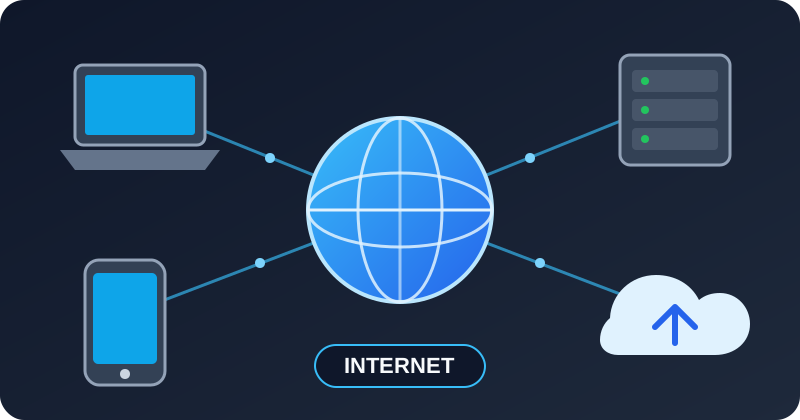
The Internet is a worldwide network of computers, servers, smartphones, and other devices that communicate with each other.
It can be thought of as a network of networks. Millions of private, public, business, educational, and government networks are connected together using common communication standards.
The Internet allows devices anywhere in the world to exchange information.
Simple Definition
The Internet is a global system of interconnected computer networks that communicate using standard protocols such as TCP/IP.
For example, when you open:
https://www.google.comyour computer communicates with Google's servers through the Internet and receives the webpage data.
Internet vs Web
The Internet and the World Wide Web (WWW) are not the same thing.
The Internet is the underlying communication infrastructure.
The Web is one of the services that operates on top of the Internet.
| Internet | World Wide Web |
|---|---|
| Global network infrastructure | Collection of websites and web applications |
| Uses TCP/IP | Mainly uses HTTP/HTTPS |
| Supports many types of services | Primarily used through web browsers |
| Includes email, DNS, VoIP, FTP, Web, etc. | One service running over the Internet |
For example:
Internet
│
├── World Wide Web
├── Email
├── File Transfer
├── Video Streaming
├── Voice / Video Calls
├── Online Gaming
├── Cloud Services
└── Messaging
How the Internet Works
A simplified Internet communication flow looks like this:
Your Device
    │
    ▼
Router / Wi-Fi
    │
    ▼
Internet Service Provider
    │
    ▼
Internet
    │
    ▼
Destination Server
For example, when visiting:
https://example.comthe process is approximately:
Browser
   │
   │ 1. Find server IP using DNS
   ▼
DNS Server
   │
   │ 2. Returns IP address
   ▼
Browser
   │
   │ 3. Connect to server
   ▼
Internet
   │
   ▼
Web Server
   │
   │ 4. Server sends webpage
   ▼
Browser
Devices Connected to the Internet
Many different types of devices can connect to the Internet, including:
- Desktop computers
- Laptops
- Smartphones
- Tablets
- Servers
- Smart TVs
- Security cameras
- Routers
- IoT devices
- Industrial machines
- Smart home devices
- Vehicles
Each communicating device typically uses an IP address to identify itself or its network location.
IP Address
An IP address is an address used to identify devices and route communication across IP networks.
Examples:
IPv4:
192.168.1.10

IPv6:
2001:db8:85a3::8a2e:370:7334
There are two major versions of IP currently used:
| Version | Example |
|---|---|
| IPv4 | 8.8.8.8 |
| IPv6 | 2001:4860:4860::8888 |
IPv4 uses a 32-bit address, while IPv6 uses a 128-bit address.
Public and Private IP Addresses
Devices inside a home or company network commonly use private IP addresses.
Examples:
192.168.1.20
10.0.0.15
172.16.0.25
A router normally connects the private network to the Internet using a public IP address.
Example:
Internet
     │
Public IP
203.0.113.20
     │
   Router
     │
 ┌───┼───────────┐
 │   │           │
 ▼   ▼           ▼
PC  Phone      Camera

192.168.1.10
192.168.1.11
192.168.1.12
Technologies such as NAT (Network Address Translation) allow multiple private devices to communicate through a public Internet connection.
Internet Service Provider
An Internet Service Provider (ISP) is a company that provides Internet connectivity.
Examples of Internet access technologies include:
- Fiber optic
- Broadband
- Cable
- DSL
- Mobile networks such as 4G and 5G
- Satellite
- Wireless broadband
The ISP connects a user's local network to larger networks that form the Internet.
Routers
A router forwards network packets between different networks.
For example:
Computer
   │
   ▼
Home Router
   │
   ▼
ISP Router
   │
   ▼
Internet Backbone
   │
   ▼
Server Network
   │
   ▼
Web Server
A packet may travel through many routers before reaching its destination.
The route can conceptually look like:
Your PC
  ↓
Router 1
  ↓
ISP Router
  ↓
Regional Router
  ↓
Internet Backbone
  ↓
Destination ISP
  ↓
Destination Router
  ↓
Server
Internet Backbone
The Internet backbone consists of high-capacity networks connecting major regions, countries, data centers, and Internet providers.
These networks commonly use high-speed fiber-optic infrastructure.
Typical infrastructure includes:
Fiber Optic Networks
        │
        ├── Data Centers
        ├── Internet Exchanges
        ├── Telecom Networks
        ├── Submarine Cables
        └── ISP Networks
Submarine Internet Cables
A large portion of international Internet traffic travels through fiber-optic cables installed under oceans.
These cables connect continents and countries.
Simplified example:
Asia
  │
  │ Submarine Fiber Cable
  ▼
Europe
  │
  │ Submarine Fiber Cable
  ▼
North America
Satellites also provide Internet connectivity, but terrestrial and submarine fiber networks carry a large portion of global Internet traffic.
Internet Exchange Points
An Internet Exchange Point (IXP) is infrastructure where different networks exchange Internet traffic.
For example:
        ISP A
          │
          ▼
        ┌─────┐
ISP B → │ IXP │ ← ISP C
        └─────┘
          ▲
          │
      Data Center
IXPs can reduce unnecessary routing distance and improve network performance.
Internet Protocol
The Internet relies heavily on the Internet Protocol (IP).
IP is responsible for addressing devices and routing packets toward their destinations.
Two major Internet protocol families are:
IPv4
IPv6
TCP/IP
The Internet commonly uses the TCP/IP protocol suite.
A simplified representation is:
Application Layer
HTTP / HTTPS / DNS / SMTP / SSH
            │
            ▼
Transport Layer
TCP / UDP
            │
            ▼
Internet Layer
IP
            │
            ▼
Network Access Layer
Ethernet / Wi-Fi / Fiber
TCP
TCP — Transmission Control Protocol provides reliable, ordered communication between applications.
TCP includes mechanisms for:
- Connection establishment
- Packet ordering
- Retransmission
- Error detection
- Flow control
- Congestion control
Common protocols using TCP include:
HTTP
HTTPS
SSH
SMTP
FTP
UDP
UDP — User Datagram Protocol provides lightweight connectionless communication.
It has lower overhead than TCP but does not itself guarantee delivery or ordering.
It is commonly used for applications where latency is important.
Examples include:
DNS
VoIP
Online Gaming
Video Streaming
WebRTC
Some modern protocols also implement reliability mechanisms above UDP.
DNS
Humans usually access websites using names such as:
google.com
example.com
openai.com
Computers communicate using IP addresses.
The Domain Name System (DNS) translates domain names into IP addresses.
Example:
User enters:

example.com

        │
        ▼

DNS Lookup

        │
        ▼

IP Address

        │
        ▼

Web Server
DNS can therefore be thought of as one of the Internet's distributed naming systems.
Domain Names
A domain name is a human-readable Internet name.
Example:
www.example.comIt can be divided into parts:
www.example.com
│      │      │
│      │      └── Top-Level Domain
│      └───────── Domain
└──────────────── Subdomain
HTTP and HTTPS
Web browsers communicate with web servers primarily using HTTP or HTTPS.
HTTP stands for:
Hypertext Transfer ProtocolHTTPS is HTTP protected using TLS encryption.
Example:
Browser
   │
 HTTPS
   │
   ▼
Internet
   │
   ▼
Web Server
HTTPS helps protect data from being read or modified while it travels between the client and server.
Packets
Information sent through the Internet is divided into smaller units called packets.
Instead of sending one huge block:
HELLO INTERNETthe network may transport smaller pieces conceptually like:
Packet 1 → HELLO
Packet 2 → INTER
Packet 3 → NET
Depending on the protocol, the receiving system processes or reconstructs the information.
Packets normally contain information such as:
Source Address
Destination Address
Protocol Information
Payload
Client and Server
Many Internet applications follow a client-server architecture.
The client requests something.
The server provides a response.
Example:
Client
Browser
   │
   │ HTTP Request
   ▼
Server
   │
   │ HTTP Response
   ▼
Client
Examples of clients include:
- Web browsers
- Mobile applications
- Desktop applications
- Email applications
Examples of servers include:
- Web servers
- Database servers
- Email servers
- DNS servers
- Game servers
- API servers
Example: Opening a Website
Suppose you enter:
https://example.cominto your browser.
A simplified sequence is:
1. Browser reads the domain name.

2. DNS resolves the domain name to an IP address.

3. The browser establishes a connection to the destination.

4. Routers forward packets across networks.

5. The request reaches the web server.

6. The web server processes the request.

7. The server sends a response.

8. The browser receives the data.

9. The browser renders the webpage.
Conceptually:
Browser
   │
   ▼
DNS
   │
   ▼
Router
   │
   ▼
ISP
   │
   ▼
Internet
   │
   ▼
Web Server
   │
   ▼
Internet
   │
   ▼
Browser
Common Internet Services
The Internet supports many different services.
| Service | Common Protocols |
|---|---|
| Websites | HTTP / HTTPS |
| SMTP / IMAP / POP3 | |
| Domain resolution | DNS |
| File transfer | FTP / SFTP |
| Remote administration | SSH |
| Voice communication | SIP / RTP / WebRTC |
| Video streaming | HTTP-based streaming |
| Messaging | HTTPS / WebSocket |
| Cloud services | HTTPS / APIs |
Internet Ports
Network applications often use port numbers to identify services.
Examples:
| Port | Common Service |
|---|---|
| 20/21 | FTP |
| 22 | SSH |
| 25 | SMTP |
| 53 | DNS |
| 80 | HTTP |
| 443 | HTTPS |
For example:
192.0.2.10:443means communication with port 443 on the specified IP address.
LAN vs WAN vs Internet
LAN
A Local Area Network (LAN) connects devices within a limited area.
Example:
Office

PC ──┐
     ├── Switch ── Router
PC ──┤
     │
Server┘
WAN
A Wide Area Network (WAN) connects networks across larger geographic areas.
Office A
   │
   ▼
WAN
   │
   ▼
Office B
Internet
The Internet connects enormous numbers of independent networks globally.
LAN
 │
 ▼
ISP
 │
 ▼
Internet
 │
 ├── Companies
 ├── Data Centers
 ├── Governments
 ├── Universities
 ├── Cloud Providers
 └── Other Networks
Intranet vs Internet
An intranet is a private network typically accessible only to authorized users within an organization.
The Internet is a global interconnected network.
Example:
Company Employees
       │
       ▼
    Intranet
       │
       ▼
Internal ERP
Compared with:
User
 │
 ▼
Internet
 │
 ▼
Public Website
Who Owns the Internet?
There is no single organization that owns the entire Internet.
Instead, the Internet consists of networks and infrastructure operated by many organizations, including:
- Internet service providers
- Telecom companies
- Cloud providers
- Governments
- Universities
- Businesses
- Data-center operators
- Content delivery networks
- Individual organizations
Different technical organizations coordinate standards, names, addresses, and interoperability.
Internet Standards
Internet technologies rely on open standards so systems from different vendors can communicate.
Important standards and technologies include:
IP
TCP
UDP
DNS
HTTP
HTTPS
TLS
BGP
Ethernet
Wi-Fi
Standards organizations such as the Internet Engineering Task Force (IETF) publish many Internet protocol specifications.
Internet Routing
Routers determine where packets should travel.
Inside networks, several routing protocols may be used.
Between large autonomous networks on the Internet, BGP — Border Gateway Protocol is a key routing protocol.
Simplified:
Network A
   │
   ▼
ISP A
   │
   │ BGP
   ▼
ISP B
   │
   ▼
Network B
Autonomous Systems
Large Internet networks are commonly organized as Autonomous Systems (AS).
An autonomous system can represent a large ISP, cloud provider, enterprise, or other network operator.
Each public autonomous system is identified by an Autonomous System Number (ASN).
Conceptually:
AS 1
 │
 ├──────── AS 2
 │           │
 │           └──── AS 4
 │
 └──────── AS 3
BGP exchanges routing information between these systems.
Data Centers
A data center is a facility containing computing and networking infrastructure such as:
- Servers
- Storage systems
- Routers
- Switches
- Firewalls
- Power systems
- Cooling systems
Many Internet services operate from data centers.
Example:
User
 │
 ▼
Internet
 │
 ▼
Data Center
 │
 ├── Load Balancer
 │
 ├── Web Servers
 │
 ├── Application Servers
 │
 └── Database Servers
Cloud Computing and the Internet
Cloud services rely heavily on Internet connectivity.
Examples include:
Cloud Storage
Virtual Machines
Managed Databases
Web Applications
APIs
Video Streaming
Artificial Intelligence Services
A simplified architecture:
Users
  │
  ▼
Internet
  │
  ▼
Cloud Provider
  │
  ├── Compute
  ├── Storage
  ├── Database
  └── Networking
Internet Security
Because the Internet connects systems globally, security is extremely important.
Common security technologies include:
Firewall
TLS/HTTPS
VPN
Authentication
Encryption
IDS/IPS
Access Control
Multi-Factor Authentication
A firewall, for example, can control which network traffic is allowed:
Internet
   │
   ▼
Firewall
   │
   ▼
Private Network
Advantages of the Internet
The Internet provides many benefits:
- Global communication
- Instant access to information
- Online education
- Remote working
- E-commerce
- Cloud computing
- Video conferencing
- Entertainment
- Online banking
- Software development
- IoT connectivity
- Business collaboration
Risks of the Internet
Internet usage also introduces risks such as:
- Malware
- Phishing
- Identity theft
- Data breaches
- Spam
- Online scams
- Privacy loss
- Distributed denial-of-service attacks
- Unauthorized access
Users and organizations should therefore use proper cybersecurity practices.
Simple Internet Architecture
                    INTERNET

                       │
       ┌───────────────┼───────────────┐
       │               │               │
       ▼               ▼               ▼
      ISP             ISP             ISP
       │               │               │
       ▼               ▼               ▼
   Home User        Company        Data Center
       │               │               │
       ▼               ▼               ▼
    Router          Firewall         Router
       │               │               │
   ┌───┼───┐       ┌───┼───┐       ┌───┼───┐
   │   │   │       │   │   │       │   │   │
   PC Phone TV    PC Server IoT    Web API DB
Summary
The Internet is a global network of interconnected networks.
Its basic communication flow can be summarized as:
Device
  ↓
Local Network
  ↓
Router
  ↓
ISP
  ↓
Internet Backbone
  ↓
Destination Network
  ↓
Server
Important technologies that make the Internet possible include:
IP       → Addressing and routing
TCP      → Reliable transport
UDP      → Lightweight transport
DNS      → Domain name resolution
HTTP     → Web communication
HTTPS    → Secure web communication
BGP      → Inter-network routing
TLS      → Encryption
In simple terms:
The Internet allows computers and other devices around the world to find each other, exchange data, and provide services using a common set of networking protocols.