




What Is Event-Driven Programming?
Imagine a restaurant kitchen.
The chef does not stand in the middle of the room asking every second:
Has a new order arrived?
Is the steak ready?
Did table 12 ask for water?
Has the delivery truck arrived?
Instead, the kitchen reacts when something happens.
A waiter brings in a new order.
A timer rings.
A customer requests something.
A delivery arrives.
Each of those is an:
Eventand something responds to it.
That is the basic idea behind event-driven programming.
Instead of software constantly asking what happened, it waits for something to happen and reacts.
Traditional Programming Feels Like a Checklist
Imagine a very simple program:
1. Read file
2. Process data
3. Save result
4. Exit
The program controls the sequence from beginning to end.
Conceptually:
Start
  ↓
Do A
  ↓
Do B
  ↓
Do C
  ↓
Finish
This is easy to understand because the flow is obvious.
But many real applications do not behave like a checklist.
Think about a web browser.
At any moment, the user might:
Click button
Move mouse
Press key
Receive notification
Finish download
Resize window
The software does not know which one will happen next.
That is where event-driven programming becomes useful.
A Button Click Is an Event
Suppose your application has a button:
SaveThe program does not continuously run:
Is Save clicked?
Is Save clicked?
Is Save clicked?
Is Save clicked?
Instead, it registers some code that should run when the click happens.
Conceptually:
Button
  ↓
User clicks
  ↓
Click event
  ↓
Save handler runs
The code that reacts to the event is often called an:
Event Handleror:
ListenerA Simple Example
In C#, the idea may look like:
button.Click += OnSaveClicked;Then:
void OnSaveClicked(object sender, EventArgs e)
{
    SaveDocument();
}
The application is essentially saying:
If this button is clicked, call this method.
Until the click occurs, that handler does nothing.
The Program Spends a Lot of Time Waiting
This is one of the unusual things about event-driven systems.
A desktop application may appear to be doing nothing.
But really it is waiting for events.
Conceptually:
Wait
 ↓
Event occurs
 ↓
Run handler
 ↓
Return to waiting
This loop is often called an:
Event LoopThe event loop sits at the heart of many user interfaces, browsers, servers, and asynchronous systems.
Your Browser Is Full of Events
Open a website.
Move the mouse.
That creates events.
Click a link.
Another event.
Press a key.
Another event.
A network request finishes.
Another event.
A timer expires.
Another event.
The browser is constantly processing things like:
Mouse events
Keyboard events
Network events
Timers
Rendering events
and dispatching them to the appropriate code.
Without event-driven programming, modern interactive applications would be much harder to build.
JavaScript Is a Great Example
Browser JavaScript is heavily event-driven.
You might write:
button.addEventListener("click", () => {
    console.log("Button clicked");
});
Nothing happens when that line executes except registering the listener.
Later:
User clicks button
        ↓
Browser creates click event
        ↓
Registered function runs
That separation between:
Register behaviorand:
Event happens lateris central to the model.
But Events Are Not Just User Actions
This is where event-driven programming becomes much bigger than GUI buttons.
An event could be:
Order created
Payment received
File uploaded
Sensor triggered
Call connected
Database row changed
Message received
Server started
Job completed
Almost anything meaningful can be treated as an event.
This makes the same programming model useful for both tiny desktop programs and massive distributed systems.
Imagine an Online Shop
A customer places an order.
In a traditional tightly connected system, the application might immediately do this:
Create Order
    ↓
Charge Payment
    ↓
Reduce Inventory
    ↓
Send Email
    ↓
Update Analytics
    ↓
Notify Warehouse
Every step is directly connected.
If the email service is down, perhaps the entire request becomes slower.
If analytics fails, maybe the order flow becomes more complicated.
An event-driven design can work differently.
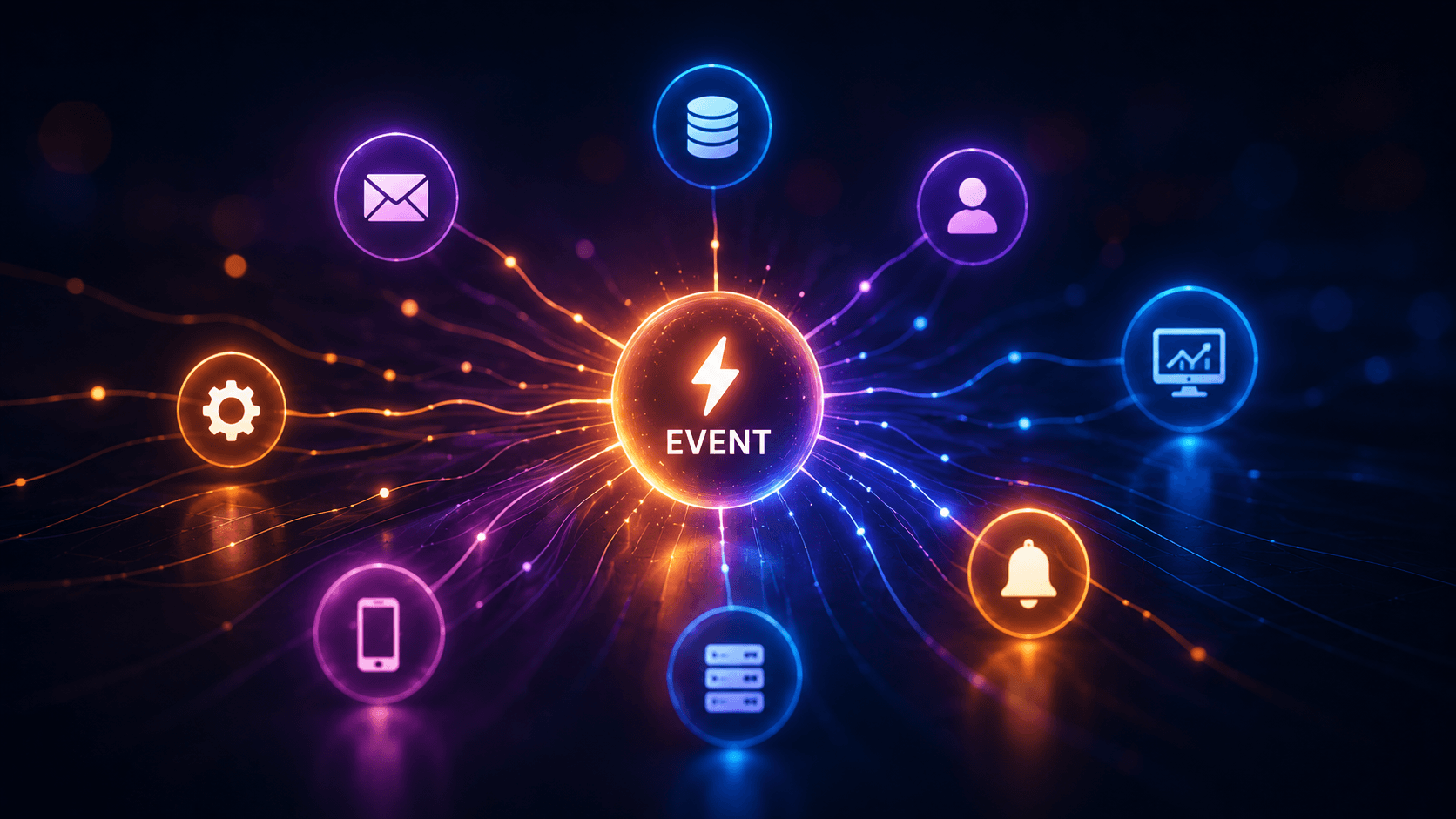
The Order Simply Announces What Happened
The order system creates the order.
Then publishes:
OrderCreatedDifferent parts of the system listen for that event.
                 OrderCreated
                      │
       ┌──────────────┼──────────────┐
       ↓              ↓              ↓
 Inventory        Email Service   Analytics
       ↓              ↓              ↓
Update Stock     Send Email      Record Sale
The order service does not necessarily need to know exactly how every other system works.
It simply announces:
An order was created.
The rest of the system reacts.
This Is Like a Newspaper
Imagine a newspaper publishes:
The city will close Main Street tomorrow.
The newspaper does not personally call:
Taxi drivers
Shop owners
Bus company
Residents
Delivery services
It publishes the information.
Interested people react.
That is similar to:
Publish / Subscribeor:
Pub/Subwhich is a common event-driven pattern.
Publishers and Subscribers
In an event-driven architecture, you often have:
Publisherand:
SubscriberThe publisher emits an event:
PaymentCompletedSubscribers may include:
Invoice Service
Email Service
Shipping Service
Analytics
Conceptually:
             PaymentCompleted
                    │
       ┌────────────┼────────────┐
       ↓            ↓            ↓
   Invoice       Shipping      Email
The publisher does not necessarily know how many subscribers exist.
That makes systems easier to extend.
Adding a New Feature Can Become Easier
Suppose six months later you want to add:
Loyalty PointsIn a tightly coupled system, you may have to modify the payment workflow.
In an event-driven system, you can add another listener:
PaymentCompleted
      ↓
Loyalty Service
      ↓
Add points
The existing payment service may not need to change at all.
That is one of the biggest advantages of event-driven design.
This Is Called Loose Coupling
Two systems are tightly coupled when they know a lot about each other.
For example:
Order Service
    ↓
Calls Email Service directly
    ↓
Calls Analytics directly
    ↓
Calls Warehouse directly
Now the order service depends on all three.
Event-driven architecture can reduce that dependency.
Order Service
    ↓
Publishes OrderCreated
and stops caring who listens.
That is:
Loose CouplingIt makes large systems easier to evolve.
Events Often Travel Through a Message Broker
In distributed systems, events need somewhere to go.
That is where technologies such as:
RabbitMQ
Apache Kafka
Azure Service Bus
Amazon SNS/SQS
NATS
Redis Streams
can appear.
The architecture might look like:
Order Service
      ↓
 Message Broker
      ↓
 ┌────┼────┐
 ↓    ↓    ↓
Email Stock Analytics
The broker helps move events between systems.
Why Not Just Call an API?
Suppose the Order Service directly calls:
POST /send-emailThat can be perfectly fine.
Not everything needs events.
The difference is about timing and dependency.
Direct API call:
Order Service
      ↓
Wait for Email Service
      ↓
Continue
Event:
Order Service
      ↓
Publish OrderCreated
      ↓
Continue immediately

Email Service handles it later
Event-driven systems are especially useful when the work does not need to happen inside the original request.
This Leads to Asynchronous Processing
Consider sending an invoice email.
The customer probably does not need to wait while the mail server finishes sending it.
Instead:
Create Invoice
     ↓
Publish InvoiceCreated
     ↓
Return response
Then:
Email Worker
     ↓
Receives event
     ↓
Sends email
The user-facing request can finish quickly.
Background systems handle the rest.
This is called:
Asynchronous processingand event-driven designs often use it heavily.
Event-Driven Does Not Always Mean Distributed
This distinction matters.
A simple desktop application can be event-driven:
Button Click
     ↓
Handler
without any network or message broker.
A large cloud system can also be event-driven:
OrderCreated
     ↓
Kafka
     ↓
12 services
Same basic philosophy.
Very different scale.
Event-Driven Programming Is Everywhere
Once you recognize the pattern, you start seeing it everywhere.
User Interfaces
Button clicked
Mouse moved
Key pressed
Window resized
Servers
HTTP request received
WebSocket message received
Connection closed
Operating Systems
File changed
USB device connected
Process exited
IoT
Temperature exceeded limit
Motion detected
Door opened
Business Systems
Invoice approved
Payment completed
Employee joined
Stock became low
Events are a natural way to describe the real world.
Think About a Fire Alarm
A building does not normally have a security guard walking around every second asking:
Is there a fire here?
Instead, sensors wait.
When smoke is detected:
Smoke detected
      ↓
Alarm event
      ↓
Siren
      ↓
Notification
      ↓
Emergency response
That is event-driven thinking.
The event represents:
Something happened.Then the system decides:
What should react?Why Event-Driven Systems Scale Well
Suppose your online shop receives:
10 orders/minuteLater:
10,000 orders/minuteIf events are stored in a broker, multiple workers can process them.
                 Events
                   ↓
              Message Queue
          ┌────────┼────────┐
          ↓        ↓        ↓
       Worker 1 Worker 2 Worker 3
Need more capacity?
Add more consumers.
This makes event-driven designs attractive for large cloud systems.
But There Is a Catch
Event-driven architecture can make systems more scalable.
It can also make them harder to understand.
In a traditional program:
A calls B
B calls C
C returns
you can follow the code.
In an event-driven system:
A publishes Event X
    ↓
Who listens?
    ↓
Maybe B, C, D, and E
    ↓
Those publish more events
Now tracing the complete workflow becomes harder.
Debugging Can Become Detective Work
Imagine a customer says:
I placed an order, but I never received the email.
The order exists.
Now you need to investigate:
Was OrderCreated published?

Did the broker receive it?

Did Email Service consume it?

Did processing fail?

Was it retried?

Did the mail provider reject it?
Instead of following one call stack, you may need to follow an event across several systems.
Observability becomes extremely important.
Events Need Good Names
Poor event:
UpdateEventWhat updated?
Why?
A better event:
PurchaseOrderApprovedor:
CustomerCreatedEvents should usually describe something that already happened.
That is why past tense is common.
For example:
OrderPlaced
PaymentReceived
InvoiceCancelled
CallConnected
The event describes a fact.
Event vs Command
This distinction is useful.
A:
Commandsays:
Please do this.
Example:
SendEmailAn:
Eventsays:
This happened.
Example:
InvoiceCreatedSo:
Command:
CreateInvoice

Event:
InvoiceCreated
The difference becomes important in large architectures.
Events Should Usually Be Immutable
Suppose you publish:
PaymentCompletedThat event represents a historical fact.
You generally should not later change it into:
PaymentNotCompletedInstead, another event may be created:
PaymentRefundedThe history becomes:
PaymentCompleted
      ↓
PaymentRefunded
This makes event logs very useful for auditing.
This Leads to Event Sourcing
Some systems take event-driven thinking even further.
Instead of storing only the current state:
Account Balance:
$850
they store the events that produced it:
AccountOpened       +0
DepositMade       +1000
PaymentMade        -100
PaymentMade         -50
Current state:
$850This approach is called:
Event SourcingThe history itself becomes the source of truth.
It can be extremely powerful.
It can also add considerable complexity.
Not every application needs it.
What Happens When an Event Fails?
Suppose a worker receives:
InvoiceCreatedand tries to generate a PDF.
But the PDF service is temporarily unavailable.
You do not necessarily want to lose the event.
So event systems commonly use:
RetryIf it keeps failing:
Dead Letter QueueThe idea is:
Process event
     ↓
Failed?
  ↙      ↘
No       Yes
↓         ↓
Done    Retry
          ↓
       Still failing?
          ↓
       Dead Letter
Reliable event processing requires careful design.
Duplicate Events Are Another Problem
Networks fail.
Acknowledgements get lost.
Retries happen.
That means a consumer may sometimes see the same event more than once.
Suppose:
PaymentReceivedis processed twice.
You definitely do not want to ship two products.
So good consumers are often designed to be:
IdempotentMeaning:
Processing the same event again should not create an incorrect second effect.
This is one of the most important practical ideas in event-driven systems.
Ordering Can Be Difficult Too
Suppose events arrive:
OrderCreated
OrderCancelled
Everything is fine.
But what if a distributed system observes:
OrderCancelled
OrderCreated
because of delays or parallel processing?
Now you have a problem.
Event-driven systems often need to think carefully about:
Ordering
Partitioning
Timestamps
Versions
This is another reason the architecture is powerful but not free.
Eventual Consistency
Imagine a customer updates their profile.
The main system changes immediately.
But analytics receives the event two seconds later.
The email system receives it five seconds later.
For a short time:
System A knows the new name
System B still knows the old name
Eventually they agree.
This model is called:
Eventual ConsistencyMany distributed systems accept this because demanding immediate consistency everywhere can be expensive and difficult.
Event-Driven Systems Feel More Like the Real World
Think about a company.
When someone joins:
Employee Joinedmany departments react.
HR creates paperwork.
IT creates an account.
Finance updates payroll.
Security creates an access card.
The person who hired the employee does not necessarily personally call every department and control every step.
The organization reacts to the event.
Software can work the same way.
A Practical Business Example
Suppose an ERP creates a purchase invoice.
It publishes:
PurchaseInvoiceCreatedThen:
                    PurchaseInvoiceCreated
                             │
            ┌────────────────┼────────────────┐
            ↓                ↓                ↓
       Accounting        Inventory        Notification
            ↓                ↓                ↓
     Create Journal     Update Stock     Notify Manager
Later you add:
Audit ServiceIt simply subscribes too.
No need to rewrite the invoice creation workflow.
That is where event-driven design becomes especially attractive in large business systems.
When Event-Driven Programming Is a Good Fit
It works particularly well when:
Many things react to one actionor:
Work should happen asynchronouslyor:
Systems should remain loosely coupledCommon examples include:
- notifications,
- background processing,
- microservices,
- IoT,
- analytics,
- workflow automation,
- real-time applications.
When It May Be Overkill
Imagine a small application:
User clicks Save
      ↓
Save row to database
      ↓
Return success
You probably do not need:
Kafka
12 consumers
Event sourcing
Distributed sagas
just to save one record.
A direct call may be simpler and better.
Event-driven architecture is a tool.
Not a requirement.
A Useful Rule
If one thing needs another thing to happen right now and needs the answer immediately:
Direct callmay make sense.
If something happened and many systems may react independently:
Eventmay make more sense.
For example:
"Check whether this customer exists."
→ request/response
versus:
"CustomerCreated"
→ event
Different communication styles for different needs.
The Entire Idea in One Picture
Traditional flow:
A
↓
B
↓
C
↓
D
Event-driven flow:
             Event
               │
      ┌────────┼────────┐
      ↓        ↓        ↓
      B        C        D
The first describes:
Do this, then this.The second describes:
This happened.
Whoever cares can react.
That is the core difference.
Final Thoughts
Event-driven programming is really about changing the way software thinks about time.
Traditional code often says:
Do A, then B, then C.
Event-driven code says:
Wait until something happens.
Then:
Event occurs
     ↓
Interested code reacts
     ↓
System continues
At a small scale, that might be:
ButtonClickedAt a huge scale:
PaymentCompletedcould trigger systems across several data centers.
The same basic idea powers:
Desktop applications
Browsers
Web servers
Message brokers
IoT devices
Microservices
Enterprise workflows
because the real world itself is event-driven.
Doors open.
Messages arrive.
Payments complete.
Users click.
Servers fail.
Orders are created.
Something happens—and something else reacts.
That simple idea is the heart of event-driven programming.